DocsSetManagerStyle Properties
Style Properties
Open any KORG style and see — and change — how it is built: the sound of every track, expression, keyboard ranges, the STS, the pads, plus Export Style, Generate Report and the Event Editor.
In this chapter you will learn
- How to open Style Properties
- What you can change: sounds (ReMap), expression, low/high key
- Single Touch Settings (STS) and pads of the style
- Exporting a style to KORG, Yamaha, MIDI, Medeli or Ketron
- Editing notes in the Event Editor
Open Style Properties#
In SetManager → STYLES, right-click a style → Properties. The SetManager view is replaced by Style Properties; Back returns.
The Style Properties screen#
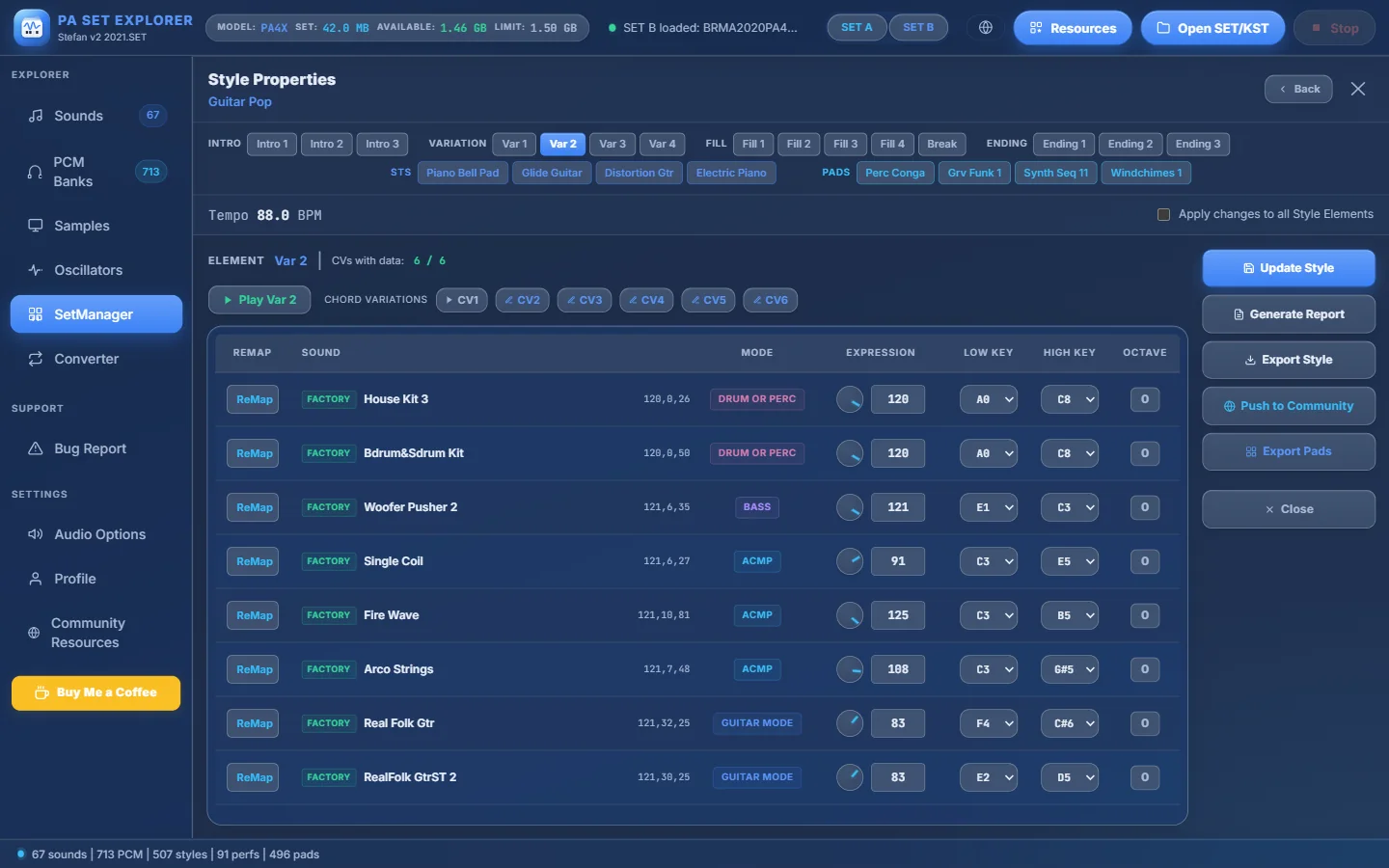
- 1The style elements: Intro 1–3, Var 1–4, Fill 1–4, Break, Ending 1–3. Click one to see its tracks.
- 2STS 1–4 — the Single Touch Settings of the style (with their names).
- 3PADS 1–4 — the pads assigned to the style. Double-click to play one.
- 4The style tempo.
- 5Apply changes to all Style Elements — ON: a change goes to the same track in every element. OFF: only to the current element (all its Chord Variations).
- 6The element you are viewing and how many Chord Variations (CVs) have data.
- 7Play the element in the Style Player.
- 8Chord Variations CV1–CV6. Click to play one; right-click for Play / Event Editor.
- 9ReMap — choose another sound for this track.
- 10The track’s sound: bank type, name and (MSB, LSB, PC).
- 11The track mode: Drum, Perc, Bass, ACMP or Guitar Mode.
- 12Expression — knob or 0–127 box.
- 13Low Key / High Key — the keyboard range of the track (A0 – C8).
- 14Octave (from the style’s STS, read-only).
- 15Update Style — write all track values into the style.
- 16Generate Report — a text report of the style.
- 17Export Style — save it in another format.
- 18Push to Community.
- 19Export Pads — the style’s pads as Yamaha or Medeli pads.
- 20Back to SetManager.
What you can change#
| Setting | Editable? | How |
|---|---|---|
| Sound of a track | ✔ | ReMap → Sound Select |
| Expression | ✔ | Knob or 0–127 box |
| Low Key / High Key | ✔ | Choose A0 – C8 |
| Sounds of the STS parts | ✔ | STS tab → click a row |
| Notes of a Chord Variation | ✔ | Right-click the CV → Event Editor |
| Track mode, octave, tempo | — | Shown for information |
ReMap — choose another sound#
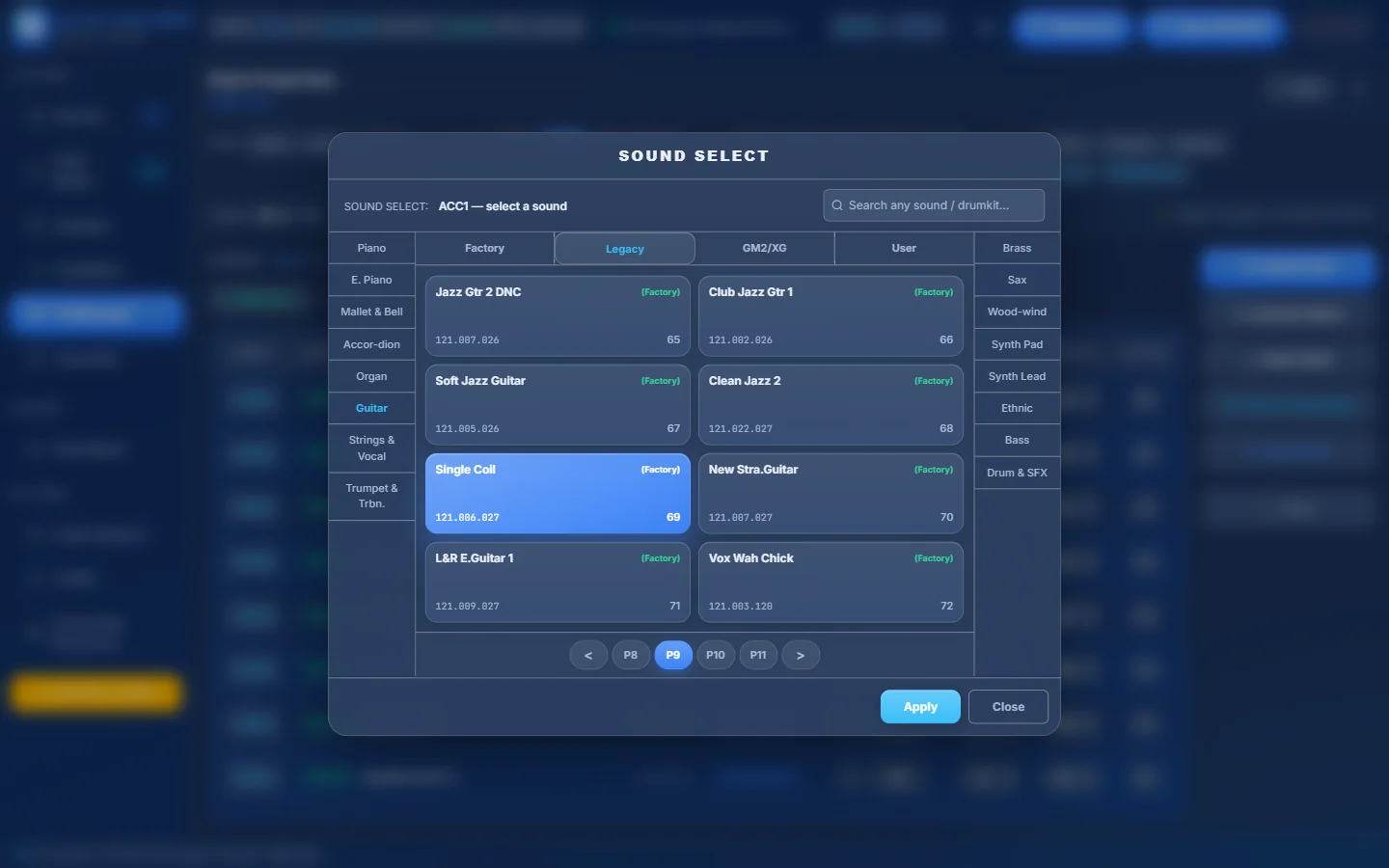
- 1Which track you are changing (here ACC1).
- 2Search a sound by name.
- 3Categories (Piano, E.Piano, Mallet & Bell, Accordion, Organ, Guitar, Strings & Vocal, Trumpet & Trombone…)…
- 4…and more categories on the right.
- 5Factory, Legacy, GM2/XG or User sounds.
- 6Each sound with its MSB.LSB.PC numbers. The current one is highlighted.
- 7Pages of the category.
- 8Apply — use the chosen sound.
Pro tips
- User shows the samplers and drum kits of your SET — perfect for giving a style your own sounds.
- With Apply changes to all Style Elements on, the new sound is used in every element of the style.
Single Touch Settings (STS)#
Click one of the STS buttons to see its four keyboard parts:
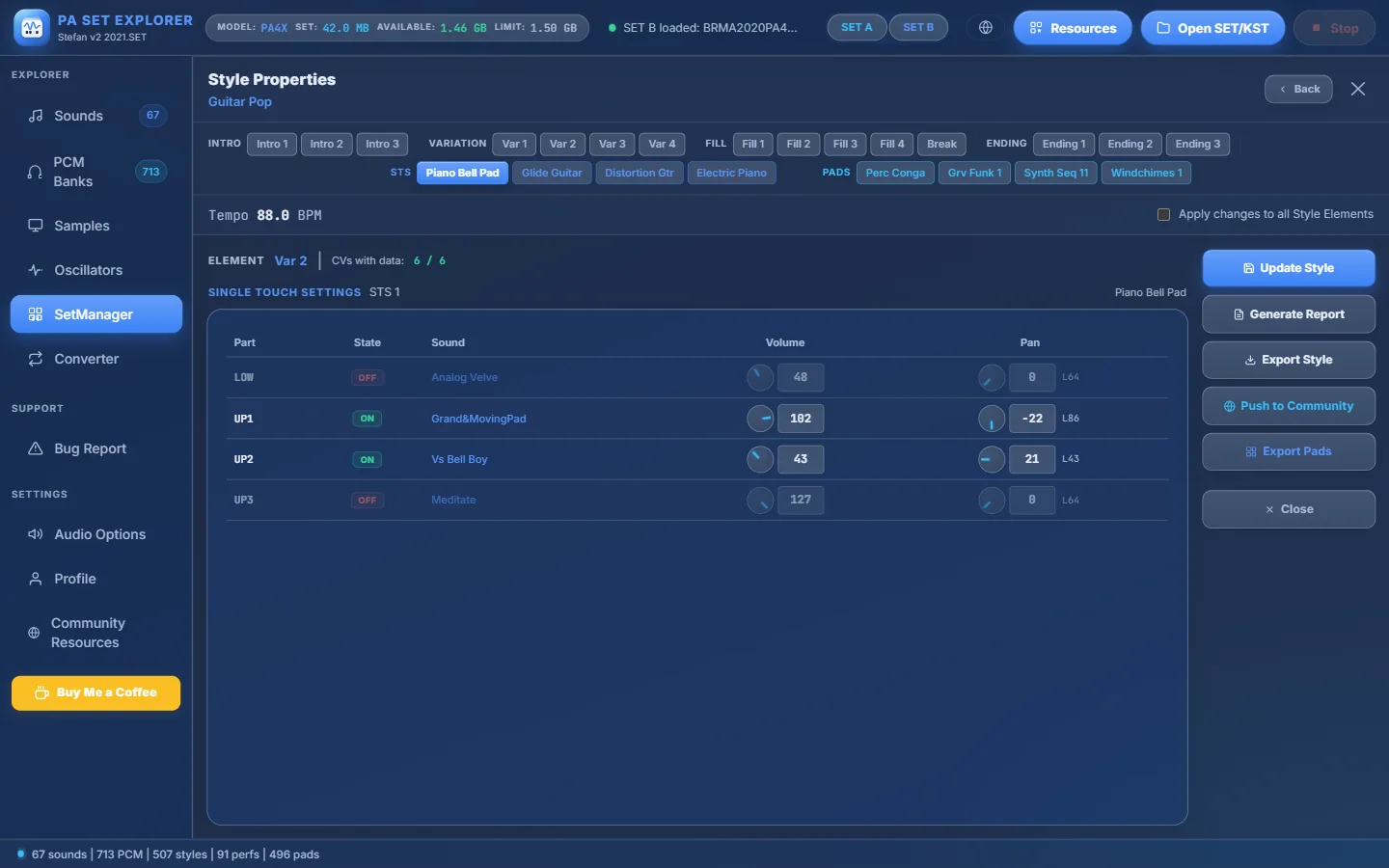
- 1STS 1 (“Piano Bell Pad”).
- 2SINGLE TOUCH SETTINGS — STS 1.
- 3State of each part: LOW, UP1, UP2, UP3 — ON or OFF.
- 4Sound of each part — click a row to change it.
- 5Volume…
- 6…and pan of each part.
Export Style#
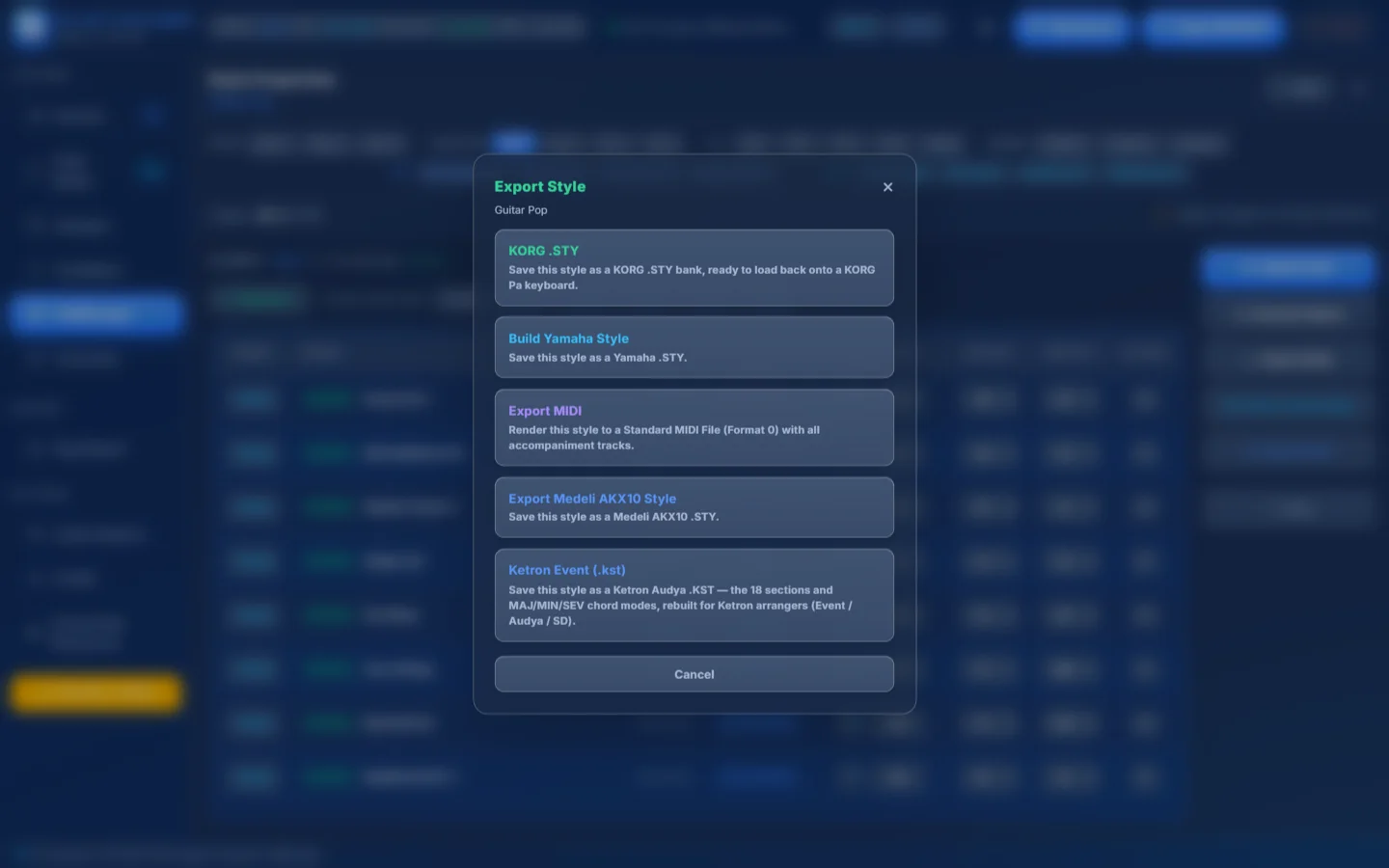
- 1KORG .STY — a KORG bank ready to load on a Pa keyboard.
- 2Build Yamaha Style — a Yamaha .STY.
- 3Export MIDI — a Standard MIDI File with all accompaniment tracks.
- 4Export Medeli AKX10 Style — a Medeli .STY.
- 5Ketron Event (.kst) — 18 sections with MAJ/MIN/SEV, for Ketron Event / Audya / SD.
For Yamaha and Medeli you may be asked whether to transcribe Guitar Mode tracks into real guitar notes.
The Event Editor — edit the notes#
- 1Right-click a Chord Variation
Right-click CV1…CV6 and choose Event Editor.
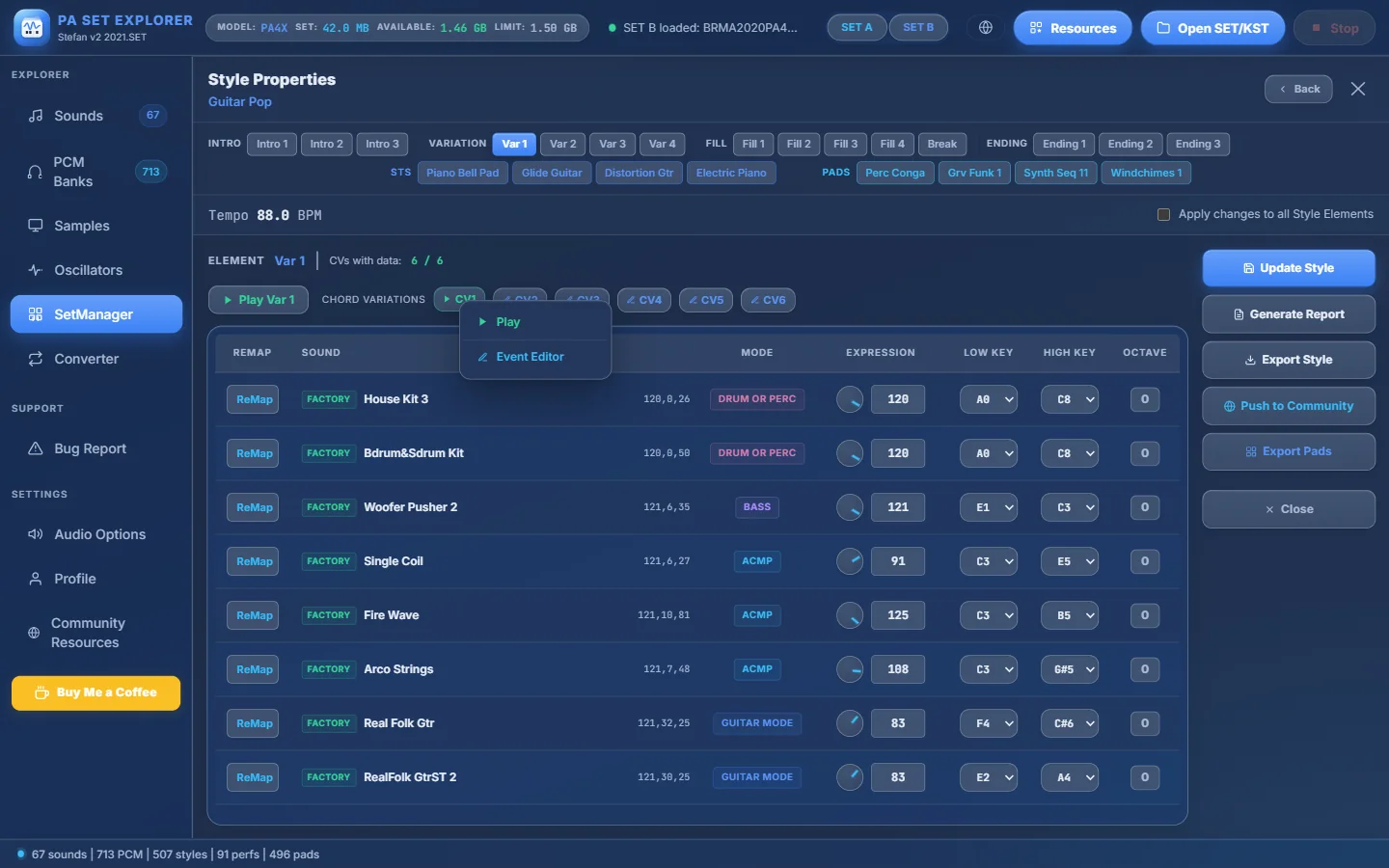
- 1CV1.
- 2Its menu: Play / Event Editor.
- 3Event Editor.
- 2Edit
A full piano-roll editor opens for that element and CV:
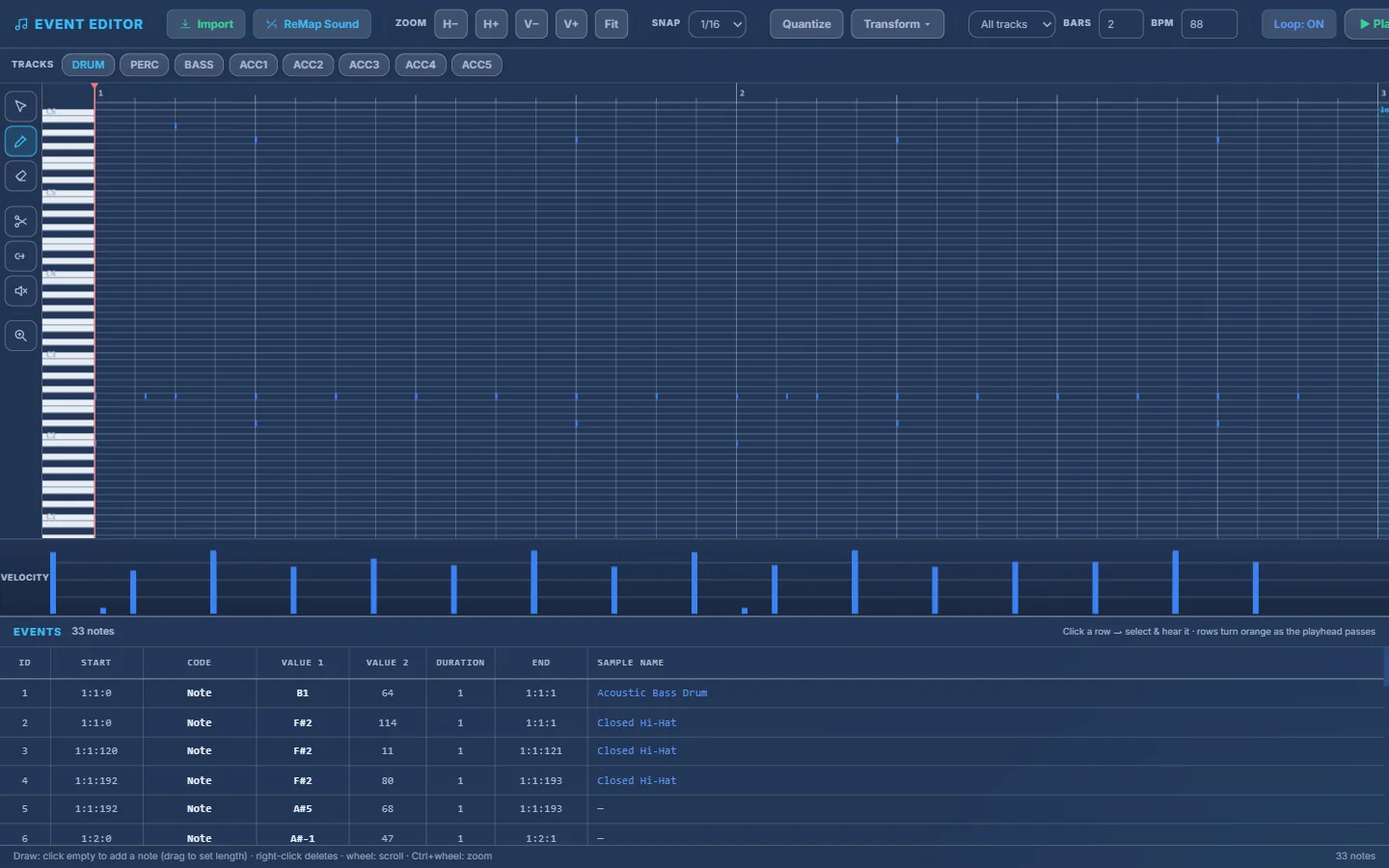
- 1Event Editor — style, element and CV.
- 2Import — bring a track from another style (step-by-step wizard).
- 3ReMap Sound — change the sound of this track.
- 4Zoom horizontally / vertically and Fit.
- 5Snap grid (1/1 … 1/64 or Off).
- 6Quantize (grid, strength, swing) and Transform (transpose ±12, legato, staccato, velocity, humanize, reverse).
- 7All tracks or Solo track.
- 8Bars (loop length) and BPM.
- 9Loop, ▶ Play, ■, then Save CV (scroll right on small screens).
- 10The tracks of the CV — DRUM, PERC, BASS, ACC1–ACC5.
- 11Tools: Select (S), Draw (D), Erase (E), Split (K), Glue (G), Mute (M), Zoom (Z).
- 12The piano roll — click empty to add a note, drag to move, drag the edge to resize, right-click to delete.
- 13Velocity lane — drag the bars.
- 14Events list — click a row to select and hear the note; rows turn orange as the playhead passes.
Event Editor of “Guitar Pop” — Main A · CV1, DRUM track.
Space
Play / stop
Ctrl+Z
Undo · Ctrl+Y redo
Ctrl+C
Copy · Ctrl+X cut · Ctrl+V paste at the playhead
Ctrl+D
Duplicate the selection
Ctrl+A
Select all
Del
Delete the selected notes
↑ / ↓
Move selected notes by a semitone (Shift = an octave)
← / →
Move selected notes by one snap step
+/ −
Zoom · Home fits the view
Esc
Close the help, or the editor
Still stuck? Ask in the forum, send a message from your profile, or use Bug Report inside the program. We read everything.