SetManager
The heart of PA SET Explorer: your SET laid out bank by bank and page by page like on the keyboard, a second SET next to it, and every tool to build, convert and clean SETs — Import/Merge, Create New Set, Convert, Medeli AKX, Copy Options and Check Unused.
- The SetManager screen: tabs, banks, pages and slots
- What every toolbar button does
- Every Copy Options switch, explained
- Create New Set and Convert (all targets and options)
- Check Unused, and the right-click menus of styles, sounds, performances and pads
The SetManager screen#
Click SetManager in the sidebar. Your SET (SET A) is shown exactly like on the keyboard: banks on the sides, the slots of the current page in the middle, page buttons at the bottom.
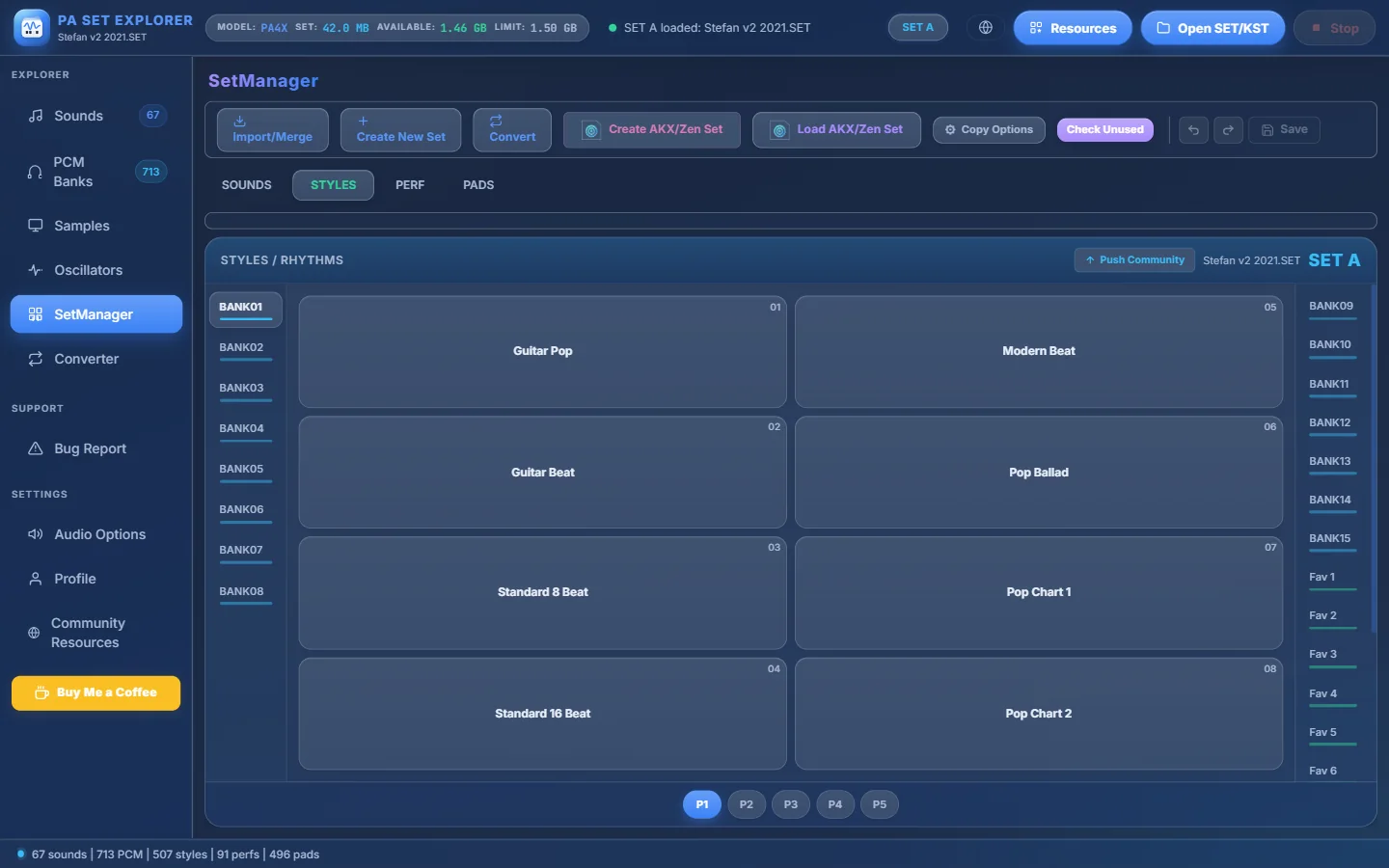
- 1Import/Merge — open a second KORG SET/KST (SET B) or a Medeli AKX set.
- 2Create New Set — an empty SET for any model PA300 – PA4X.
- 3Convert — convert the whole SET A to another format.
- 4Create AKX/Zen Set — a new, empty Medeli AKX/Zen set.
- 5Load AKX/Zen Set — open an existing AKX/Zen set.
- 6Copy Options — what travels with a style when you copy it.
- 7Check Unused — find sounds that nothing uses.
- 8Undo, Redo and Save — your changes wait here until you save.
- 9SOUNDS, STYLES, PERF and PADS tabs.
- 10Banks (first 8)…
- 11…and the rest of the banks. Fav banks are green, User banks red.
- 12Slots of the current page, numbered like on the keyboard (01–08 here).
- 13P1, P2… — the pages of the bank.
- 14The SET name and the SET A label.
- 15Push Community — share every style of this SET with the Community.
| Tab | What it shows |
|---|---|
| SOUNDS | The sound banks (.PCG): User banks with samplers and USERDK banks with drum kits, 128 slots each. Every slot shows the name and its (MSB, LSB, PC). |
| STYLES | The style banks (.STY) — or, on a PA5X KST, the style folders (.stg). |
| PERF | The performances (.PRF). |
| PADS | The pads (.PAD). |
- On a PA5X KST all banks are listed in a two-column grid and each page has 10 slots instead of 8.
- Press Ctrl+F in SetManager to search a sound, style, performance or pad by name (in SET A or SET B).
- Double-click a style to select it; right-click anything for its menu.
SET A and SET B side by side#
After Import/Merge → KORG SET / KST, the second SET appears on the right as SET B:
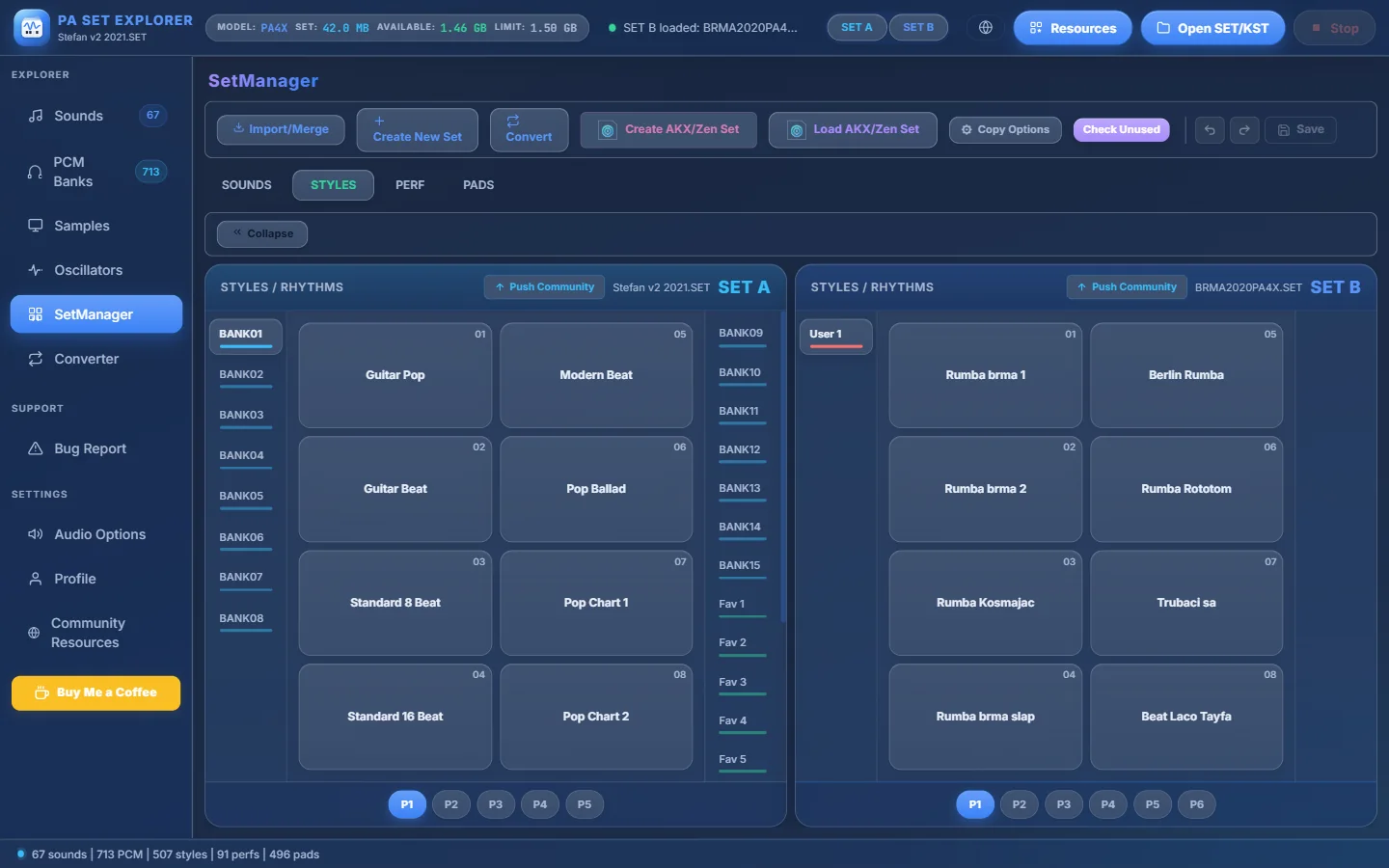
- 1SET A — your SET, the destination. You edit and save this one.
- 2SET B — the source SET.
- 3Collapse — hide SET B (it stays loaded).
- 4SET A / SET B — choose which SET the Sounds, PCM, Samples and Oscillators sections show.
- 5SET B has its own banks…
- 6…its own slots…
- 7…and you drag what you want onto a slot of SET A.
- 8SET B pages.
- 9The status tells you what was loaded.
Everything about dragging styles, sounds and pads — and what is copied along — is explained in Combining SETs.
Import/Merge#
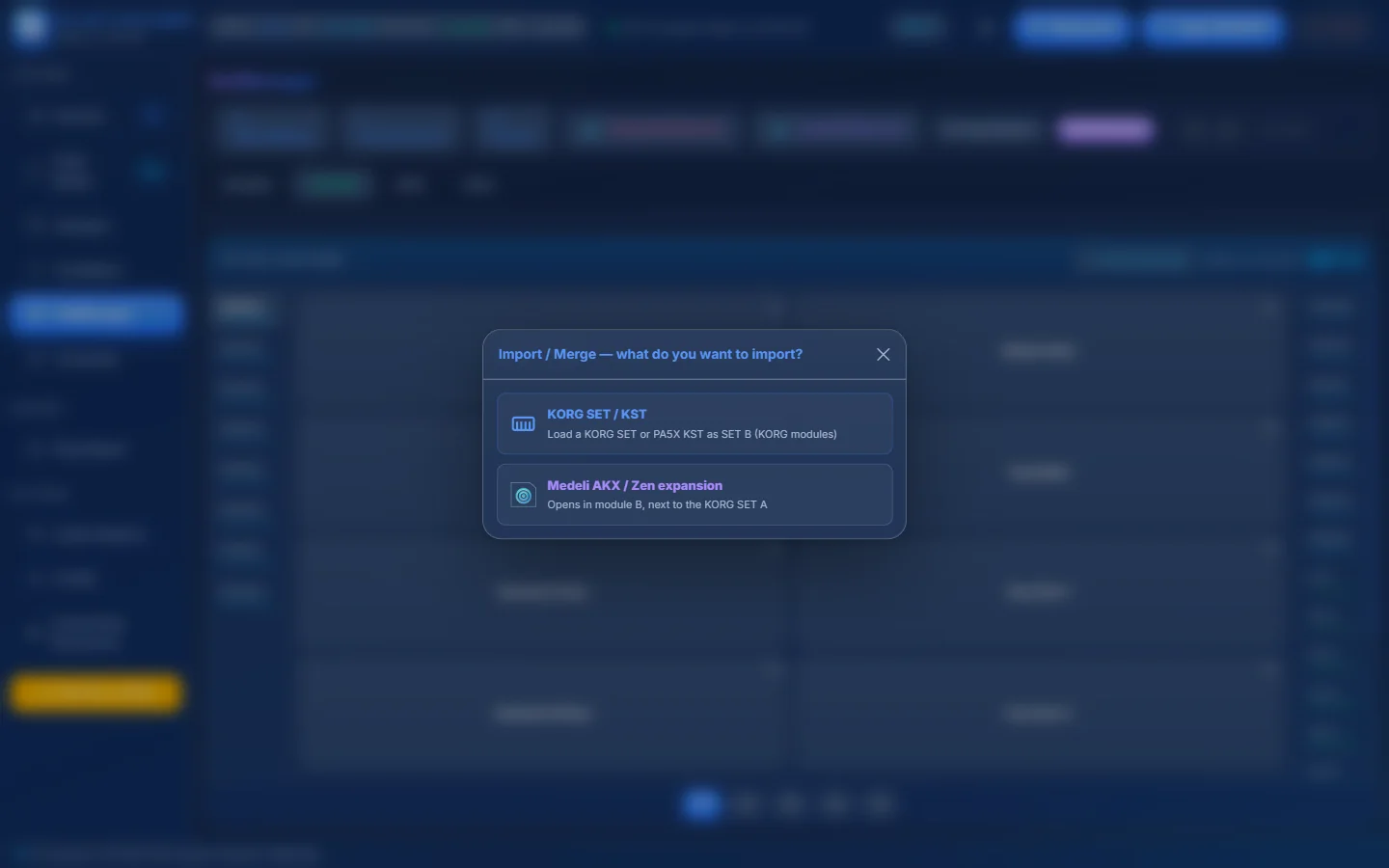
- 1KORG SET / KST — opens your Resources library in “Import/Merge” mode: double-click a SET or KST to load it as SET B.
- 2Medeli AKX / Zen expansion — opens an AKX/Zen set (.GSTarget). The text under it tells you where it will appear: next to your KORG SET A, or as AKX SET B next to an AKX SET A.
| You have open… | You import… | Result |
|---|---|---|
| A KORG SET or KST | a KORG SET / KST | It becomes SET B next to SET A. Drag styles, sounds and pads from B to A. |
| A KORG SET or KST | a Medeli AKX / Zen set | The AKX set opens next to the KORG SET. Drag KORG styles, samplers and drum kits onto its packs. |
| A Medeli AKX set | another AKX / Zen set | It opens as AKX SET B (source). Drag its items onto the packs of AKX SET A. |
| A Medeli AKX set | a KORG SET / KST | The KORG SET opens next to the AKX set. |
Create New Set#
Builds a brand-new, empty KORG SET that you can fill with styles and sounds from other SETs.
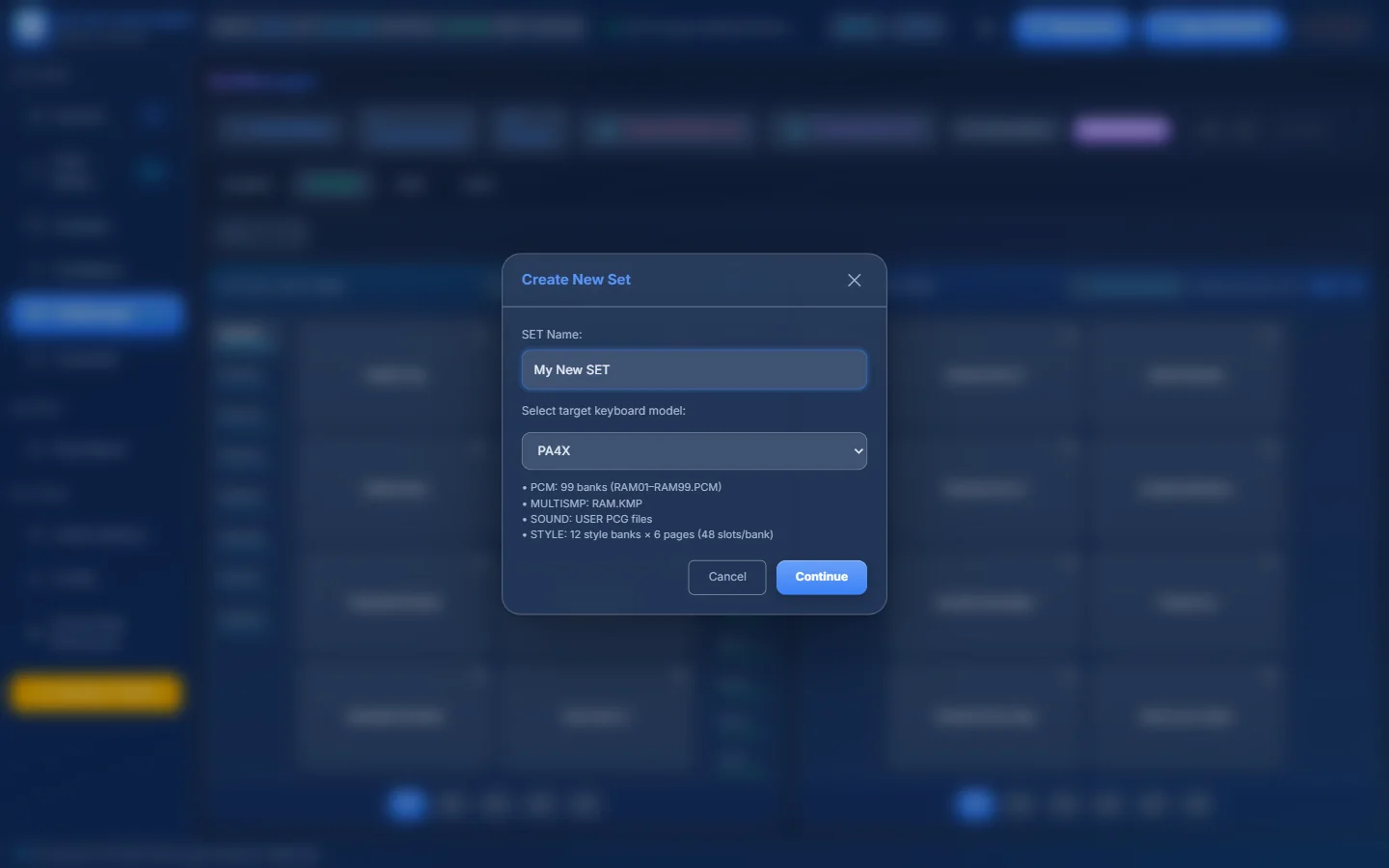
- 1SET Name — the name of the new SET folder.
- 2Target keyboard model — PA300, PA600, PA900, PA3X, PA700, PA1000 or PA4X.
- 3What will be created: 99 PCM banks (RAM01–RAM99.PCM), RAM.KMP, the USER PCG files and 12 style banks.
- 4Continue — then choose the folder where the SET is created.
The new <name>.SET is created empty in the folder you choose and opened as SET A. Style banks get 5 pages on PA300 / PA600 / PA900 / PA3X and 6 pages on PA700 / PA1000 / PA4X.
Convert — the whole SET in one go#
Convert converts the complete SET A. The choices depend on what SET A is:
| SET A is… | You can convert it to… |
|---|---|
| A KORG SET (PA300 – PA4X) | KORG PA5X (.KST) · Medeli AKX / Zen · Yamaha · Ketron |
| A KORG PA5X KST | KORG PA300 / PA600 / PA900 / PA3X (.SET, 40 styles per bank) · KORG PA700 / PA1000 / PA4X (.SET, 48 styles per bank) · Medeli AKX / Zen · Yamaha · Ketron |
| A KORG SET + a Medeli AKX set are open | First choose what to convert: the KORG SET A or the Medeli AKX set (AKX → KORG). |
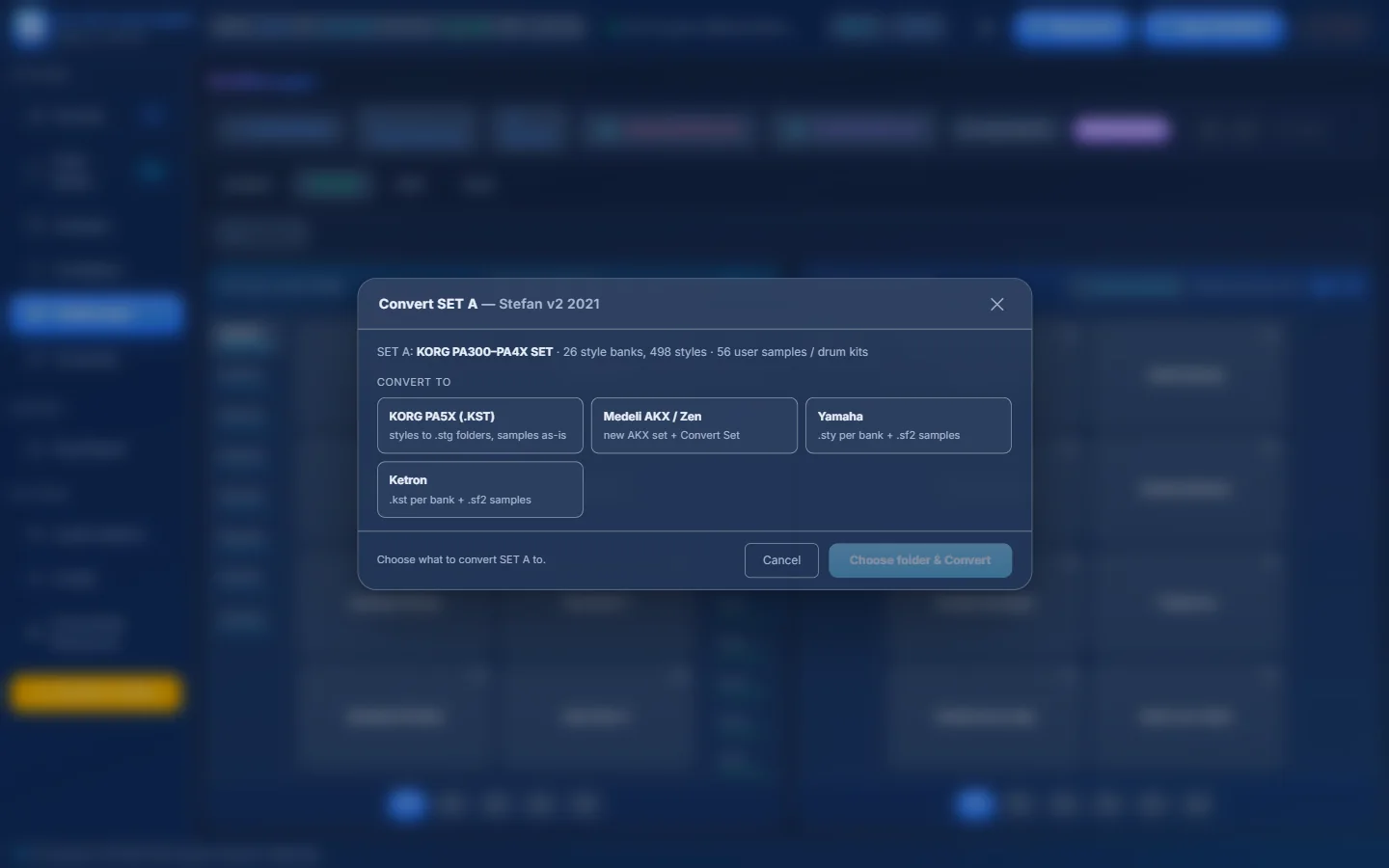
- 1What SET A is: model family, number of style banks and styles, and user samples / drum kits.
- 2KORG PA5X (.KST) — styles become PA5X .stg folders; samples come along.
- 3Medeli AKX / Zen — creates a new AKX set and converts the SET into it.
- 4Yamaha — one folder of .sty per bank, samples as .sf2.
- 5Ketron — one folder of .kst per bank, samples as .sf2.
- 6Choose folder & Convert — pick an output folder (outside the SET) and start.
KORG SET → PA5X KST#
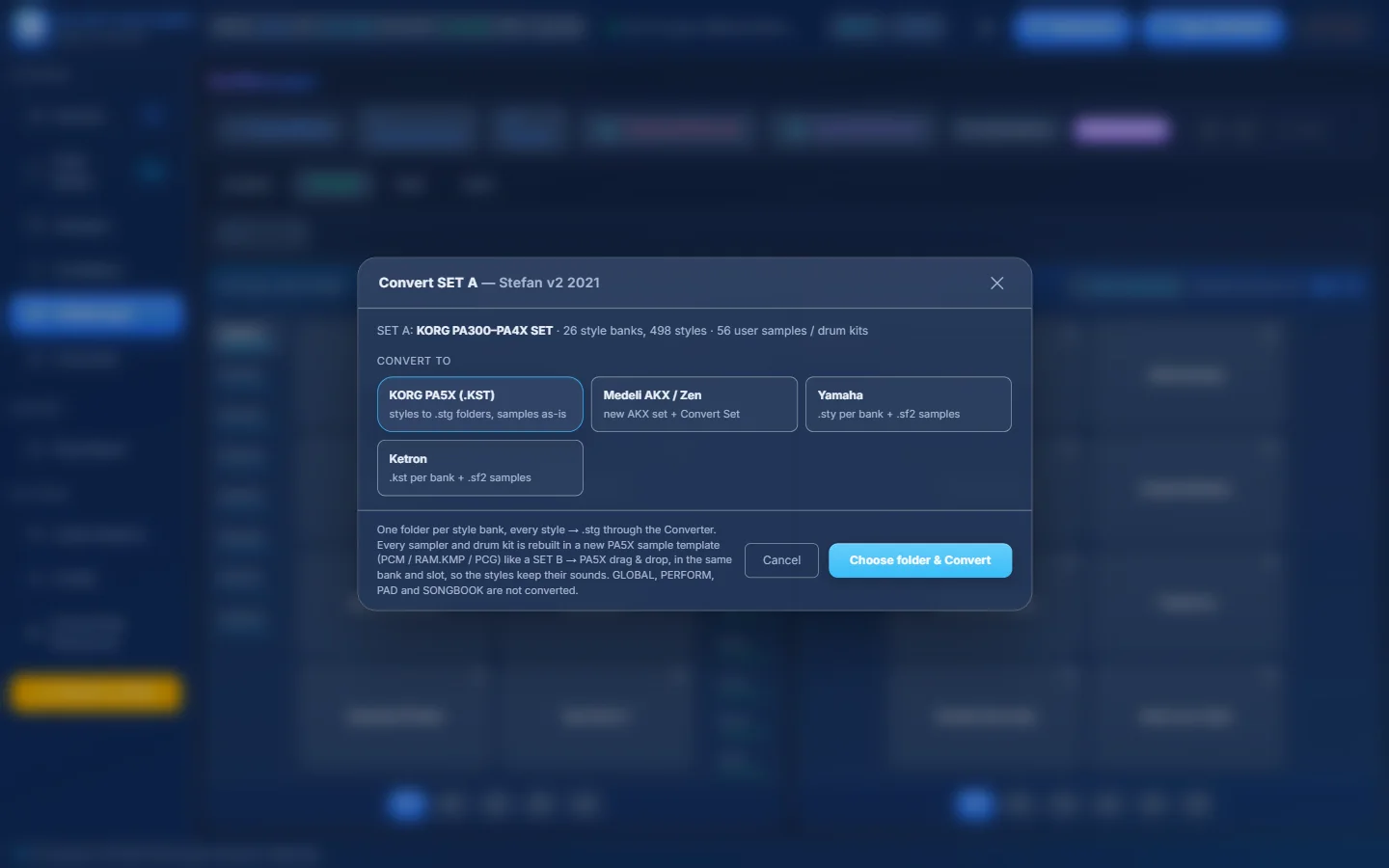
- 1KORG PA5X (.KST) selected.
- 2One folder per style bank; every style becomes .stg; every sampler and drum kit is rebuilt in a new PA5X sample template in the same bank and slot, so the styles keep their sounds.
- 3Choose the output folder and convert.
PA5X KST → older KORG SET#
- Model — older (PA300, PA600, PA900, PA3X; default PA3X) or newer (PA700, PA1000, PA4X; default PA700). The window shows how many styles per bank and how many standard banks it has.
- Style banks (.STY) — Automatic, One PA5X folder per bank, or Fill the banks one after the other. If more banks are needed than the standard 12, extra banks get new names (FAVORITE13… / USER13…).
- Style folders — tick the PA5X folders you want (All · None).
- Samples: if the KST was made from an older SET, samples and sounds are copied as they are. Native PA5X samples are not copied — bring the sounds you need afterwards with Import/Merge.
KORG → Yamaha or Ketron#
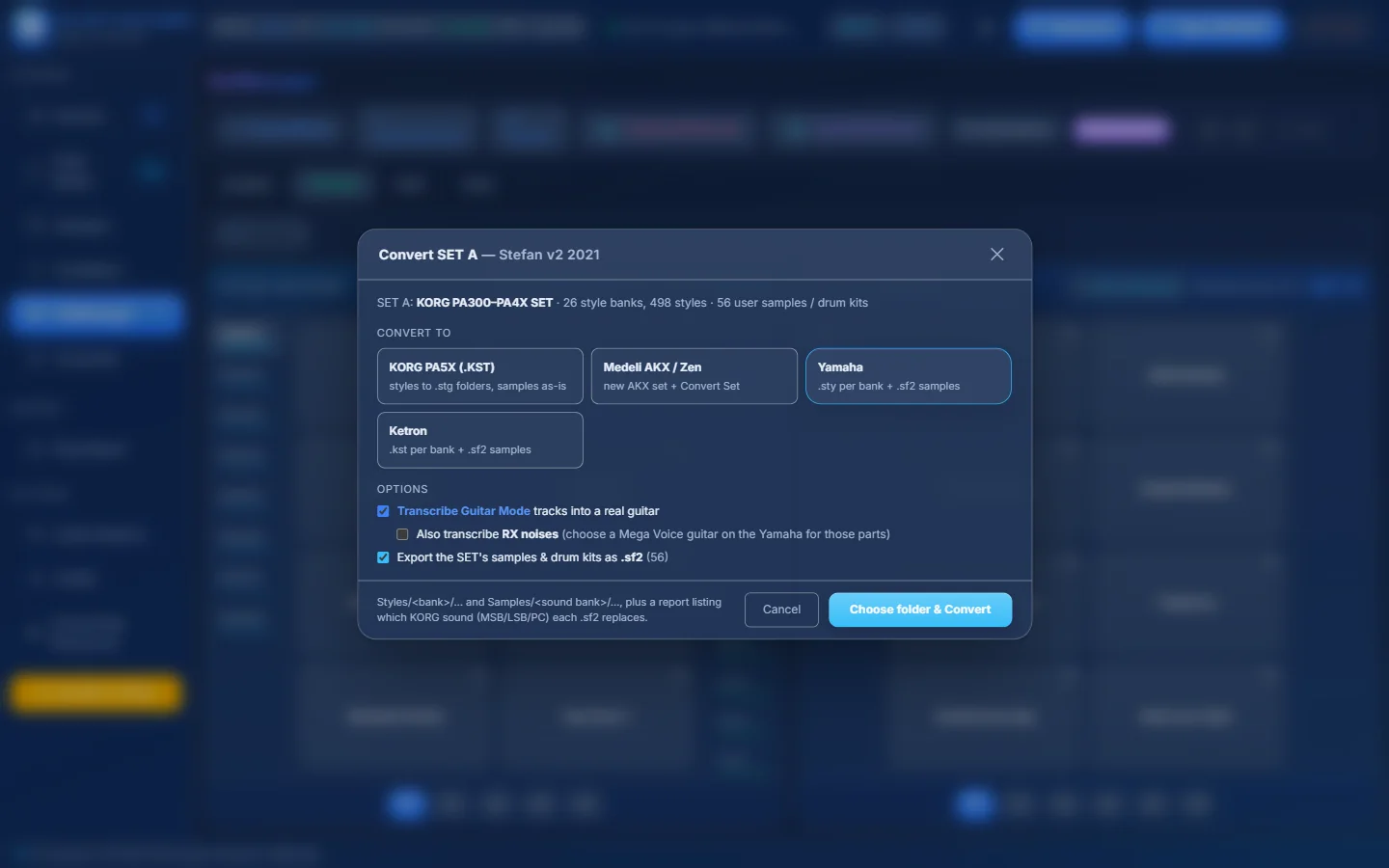
- 1Yamaha selected.
- 2Transcribe Guitar Mode tracks into a real guitar (on by default).
- 3Also transcribe RX noises — Yamaha only (choose a Mega Voice guitar on the Yamaha for those parts).
- 4Export the SET’s samples & drum kits as .sf2 — with how many there are.
- 5Output:
Styles/<bank>/…andSamples/<sound bank>/…plus a report of which KORG sound (MSB/LSB/PC) each .sf2 replaces. - 6Choose folder & Convert.
KORG → Medeli AKX / Zen#
The button becomes Create AKX Set…: you name the new AKX set and choose its memory, then the Convert KORG SET → Medeli AKX/Zen window opens by itself. See Medeli AKX → Convert a whole KORG SET.
Progress and result#
- While converting you see the overall progress, the current bank, the time left and a log. Cancel stops after the current style.
- At the end: styles converted, not converted, banks, samplers / drum kits and sample files. A conversion report (.txt) is written in the output folder.
- Load in SET B opens the new SET/KST next to yours, Open folder shows it in Windows. New SETs and KSTs are added to Resources automatically.
Create AKX/Zen Set and Load AKX/Zen Set#
Everything about Medeli AKX sets is in the Medeli AKX / Zen chapter.
Copy Options — every switch explained#
Copy Options decides what travels with a style when you copy it from SET B to SET A, or from a KORG SET to a Medeli AKX set. Set them before you drag.
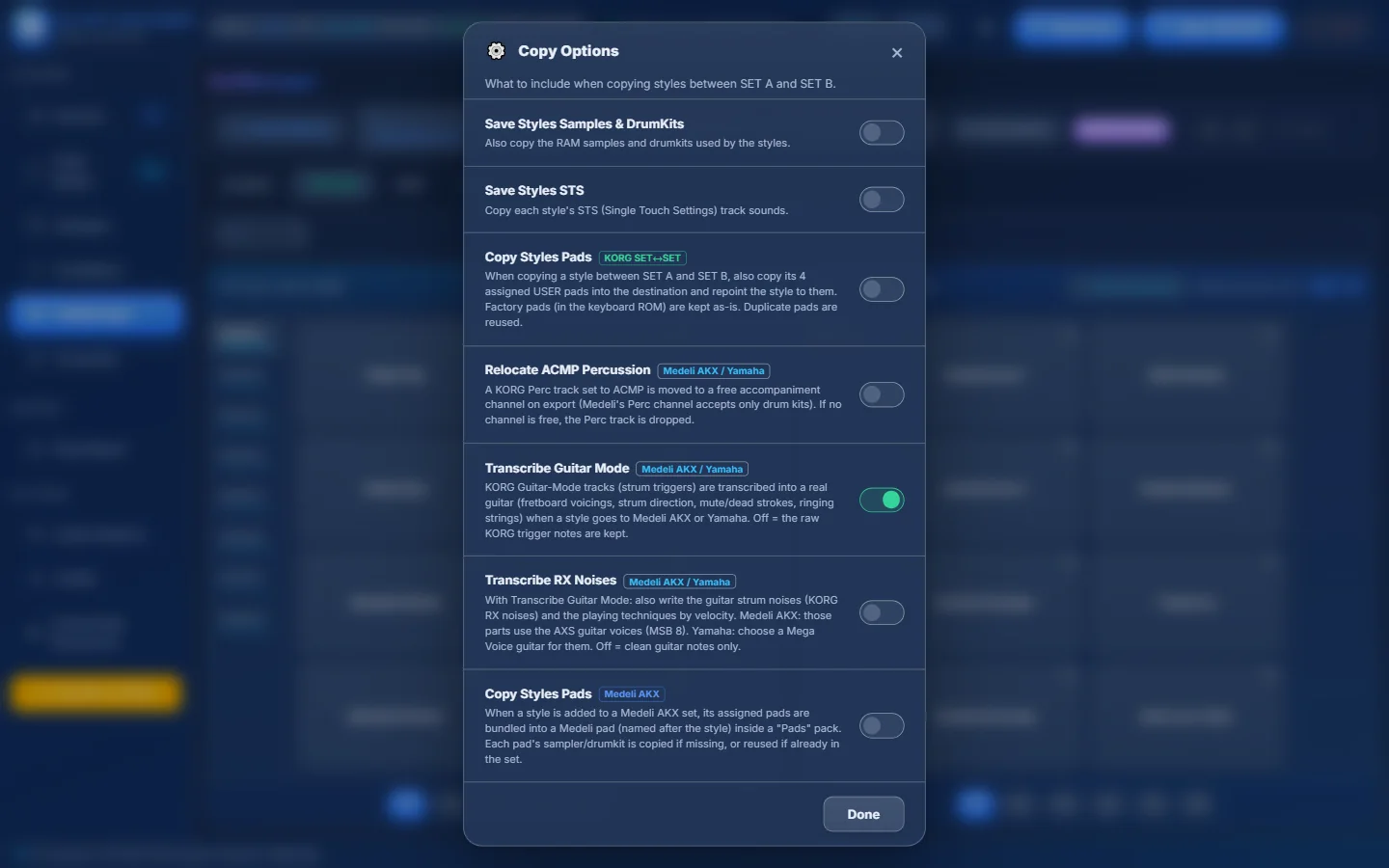
- 1Save Styles Samples & DrumKits — also copy the RAM samples and drum kits the style uses.
- 2Save Styles STS — copy the sounds of the style’s Single Touch Settings.
- 3Copy Styles Pads (KORG SET↔SET) — also copy the style’s 4 USER pads.
- 4Relocate ACMP Percussion (Medeli AKX / Yamaha) — move a melodic ACMP Perc track to a free channel.
- 5Transcribe Guitar Mode (Medeli AKX / Yamaha) — turn KORG guitar strums into real guitar notes.
- 6Transcribe RX Noises (Medeli AKX / Yamaha) — also write the guitar noises and techniques.
- 7Copy Styles Pads (Medeli AKX) — bundle the style’s pads into a Medeli pad.
- 8Done — or click outside to close.
| Switch | Default | When ON | When OFF |
|---|---|---|---|
| Save Styles Samples & DrumKits | Off | The user samplers and drum kits the style uses (RAM sounds) are copied too — with their PCM samples and multisamples — and the style is re-pointed to the copies. Into a PA5X KST the sounds come along as well. Into an AKX set the samples are converted with the style. | Only the style is copied. Its tracks keep pointing to the same sound numbers, which may be different (or empty) sounds in SET A. |
| Save Styles STS | Off | The style’s STS (Single Touch Settings) keep their sounds. When you switch it on you are asked whether to also save the PCM samples those STS sounds use if SET A does not have them (Deny / Confirm). For AKX the STS sounds go into an “STS” pack. | The copied style gets a default STS (STS 1–4 with Grand Piano on Upper 1, the other parts off). |
| Copy Styles Pads (KORG SET↔SET) | Off | The style’s 4 assigned USER pads are copied and the style points to them. Factory pads stay as they are; identical pads are reused. | The style’s USER pad references are cleared. |
| Relocate ACMP Percussion (Medeli AKX / Yamaha) | Off | A KORG Perc track set to ACMP is moved to a free accompaniment channel (Medeli’s Perc channel only accepts drum kits). If no channel is free, the track is dropped. | The Perc track stays where it is. |
| Transcribe Guitar Mode (Medeli AKX / Yamaha) | On | KORG Guitar Mode tracks are transcribed into a real guitar: fretboard voicings, strum direction, muted and dead strokes, ringing strings. | The raw KORG trigger notes are kept. |
| Transcribe RX Noises (Medeli AKX / Yamaha) | Off | With Guitar Mode on: also writes the guitar strum noises (KORG RX noises) and playing techniques by velocity. Medeli AKX uses the AXS guitar voices; on Yamaha choose a Mega Voice guitar. | Clean guitar notes only. |
| Copy Styles Pads (Medeli AKX) | Off | When a style is added to an AKX set, its pads are bundled into one Medeli pad named after the style, in a “Pads” pack. Missing samplers / drum kits are copied, existing ones reused. | No pad is created. |
- Copying styles from a SET that uses its own samples? Turn on Save Styles Samples & DrumKits — otherwise the style may play with the wrong sounds in SET A.
- Watch the memory bar: copying samples uses SET A’s sample memory. If there is not enough room, the copy stops with a clear message.
- Transcribe RX Noises only works together with Transcribe Guitar Mode (it is greyed out otherwise).
Check Unused#
Check Unused scans every sound, style and performance of SET A and lists the sounds that nothing uses. Deleting them frees slots and sample memory.
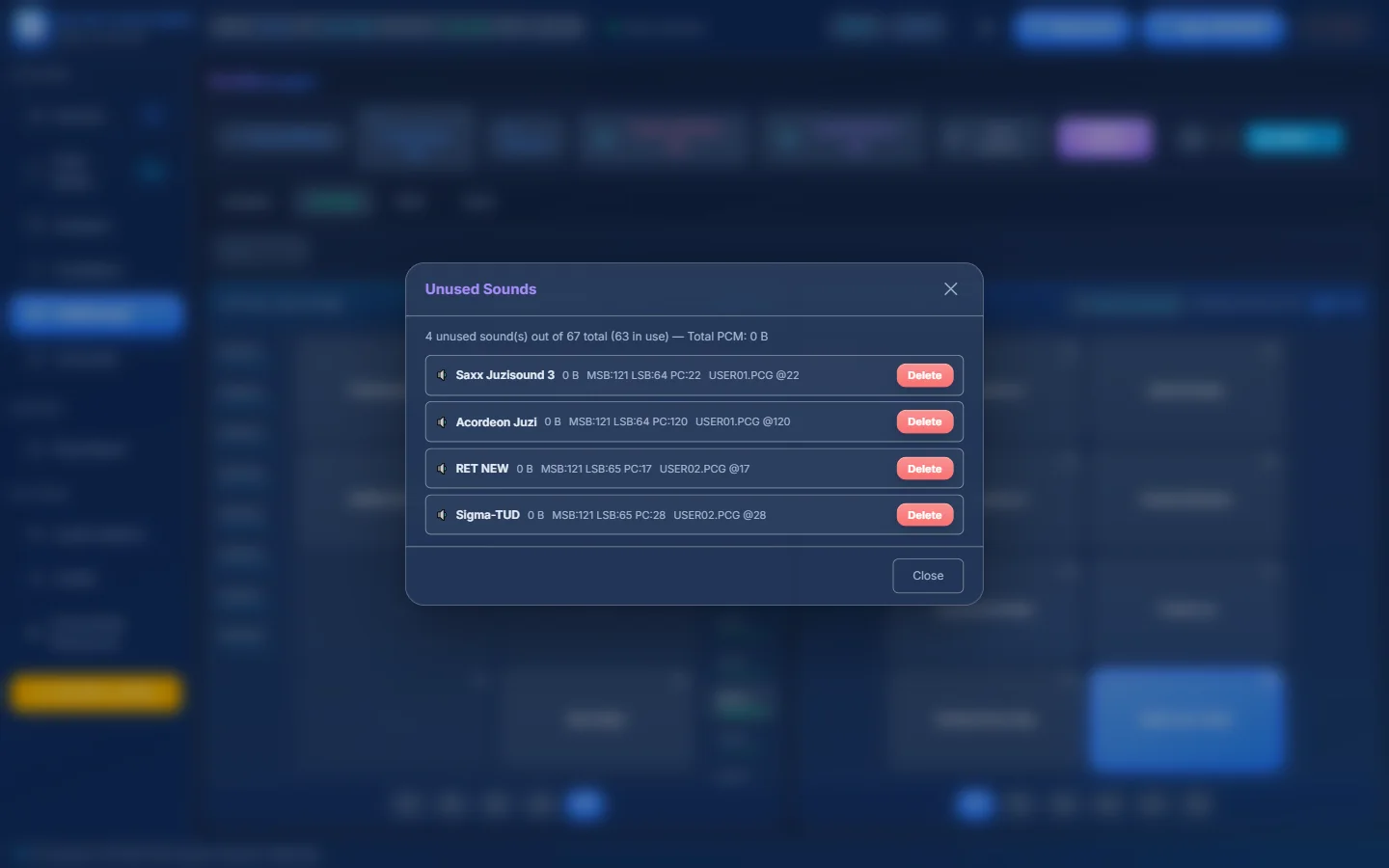
- 1How many sounds are unused out of the total, and how much PCM memory they hold.
- 2An unused sound with its size…
- 3…its MSB / LSB / PC and where it lives (file @ position).
- 4Delete — remove this sound (you are asked to confirm).
Right-click menus#
A style (SET A)#
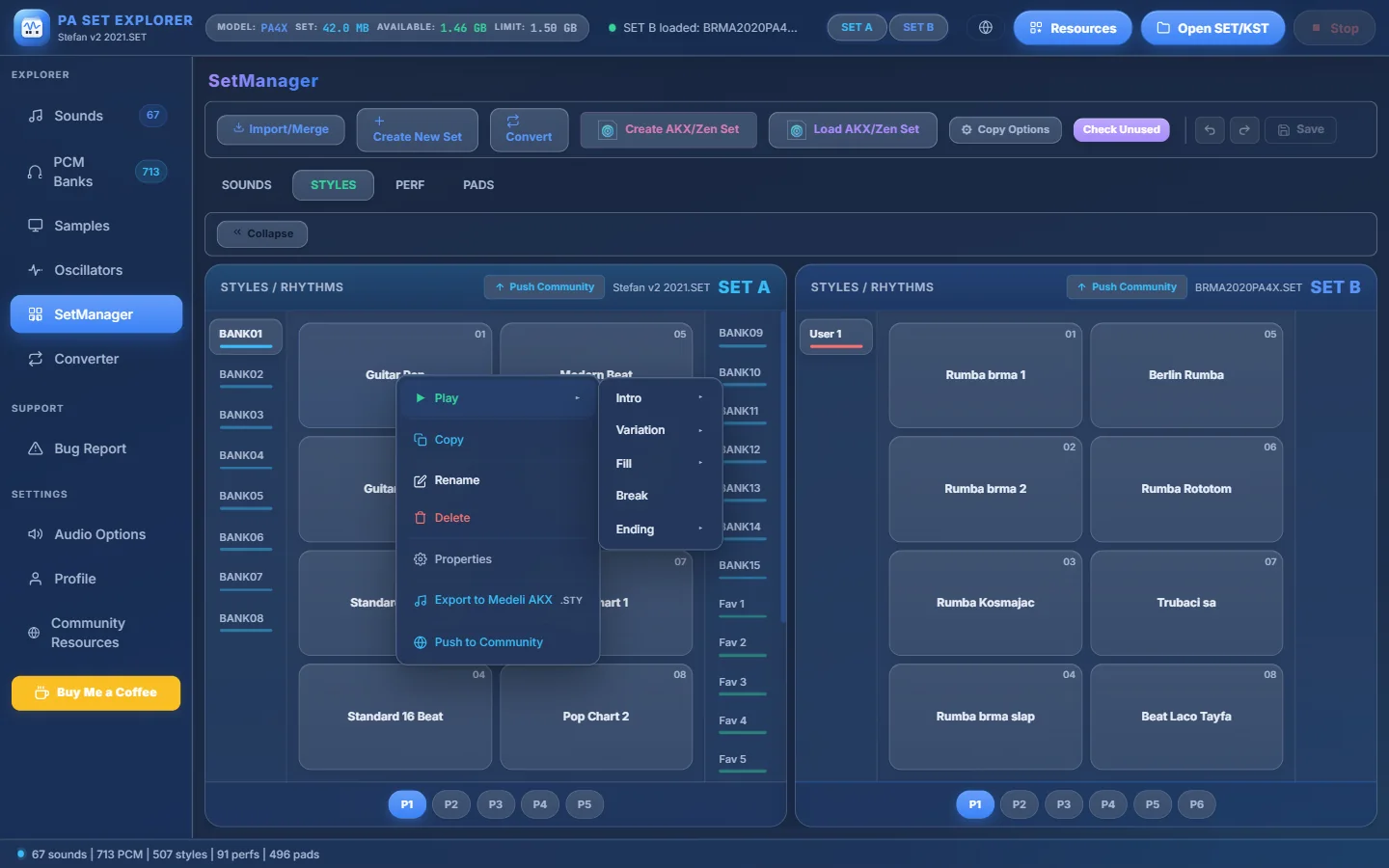
- 1Play ▸ — play a section in the Style Player…
- 2…choose Intro, Variation, Fill, Break or Ending, then its number.
- 3Copy — then right-click an empty slot → Paste.
- 4Rename — up to 24 characters.
- 5Delete — removes the style (undoable until you save).
- 6Properties — opens Style Properties.
- 7Export to Medeli AKX — save it as a Medeli .STY (optionally with its samples as .sf2).
- 8Push to Community — share it.
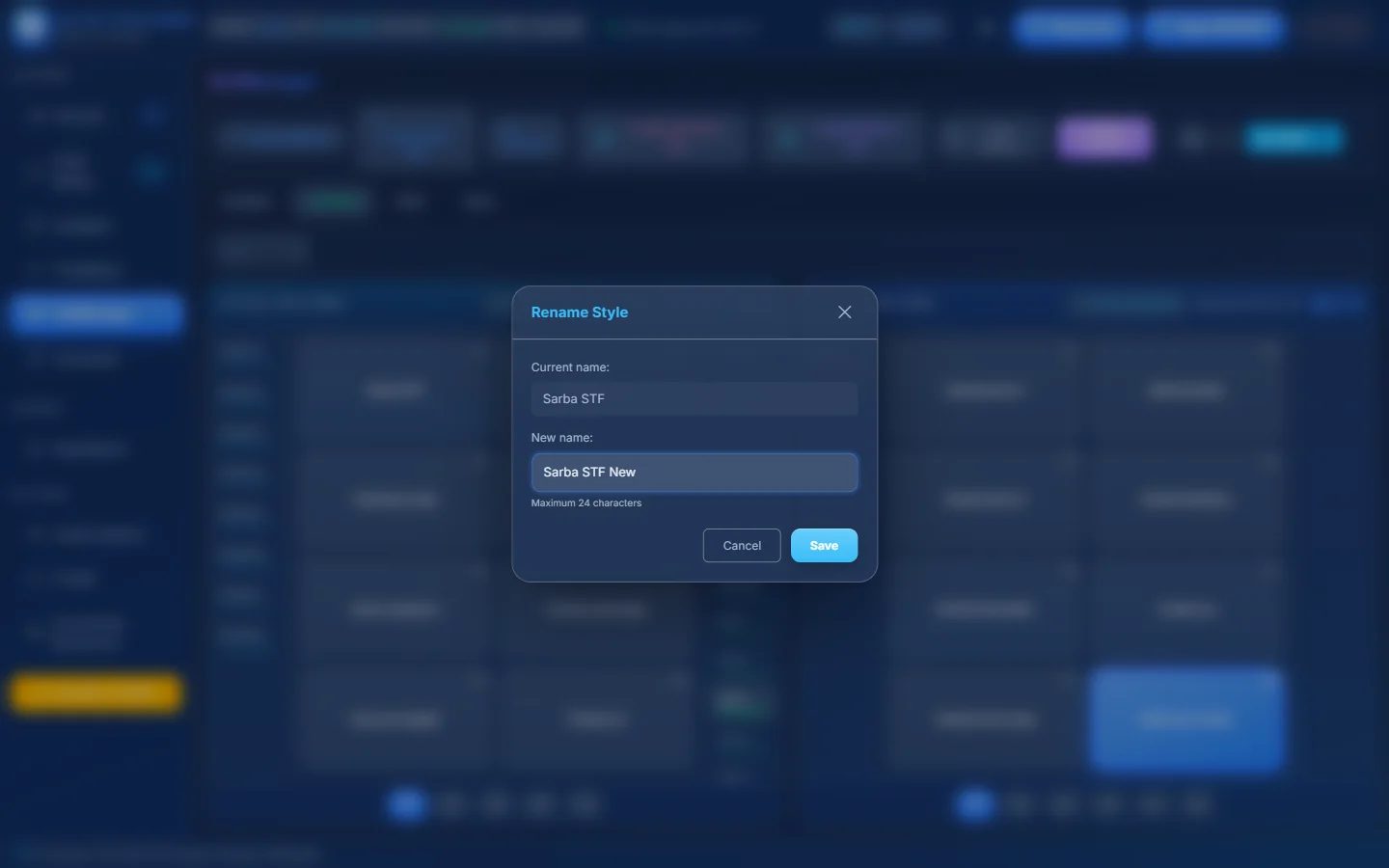
- 1The current name.
- 2Type the new name…
- 3…maximum 24 characters.
- 4Save.
| Where | Menu items |
|---|---|
| Style in SET A | Play ▸ · Copy · Rename · Delete · Properties · Export to Medeli AKX · Push to Community |
| Empty style slot | Paste (when you copied a style) · Import Style |
| Style in SET B | Play ▸ · Copy · Rename · Delete · Properties (read-only) · Copy to SET A |
| Sound (A or B) | Demo · Copy · Paste · Rename · Delete · Properties · Push to Community |
| Empty sound slot | Paste · Import Sampler (.sf2 .voi .uvn .kmp)… or Import DrumKit (.sf2 .kit .uvd)… |
| Performance | Copy · Rename · Delete · Properties |
| Pad | Listen · Properties · Export… (MIDI .mid, Yamaha Pad .pad, Medeli Pad AKX .pad) |
The SOUNDS, PERF and PADS tabs#
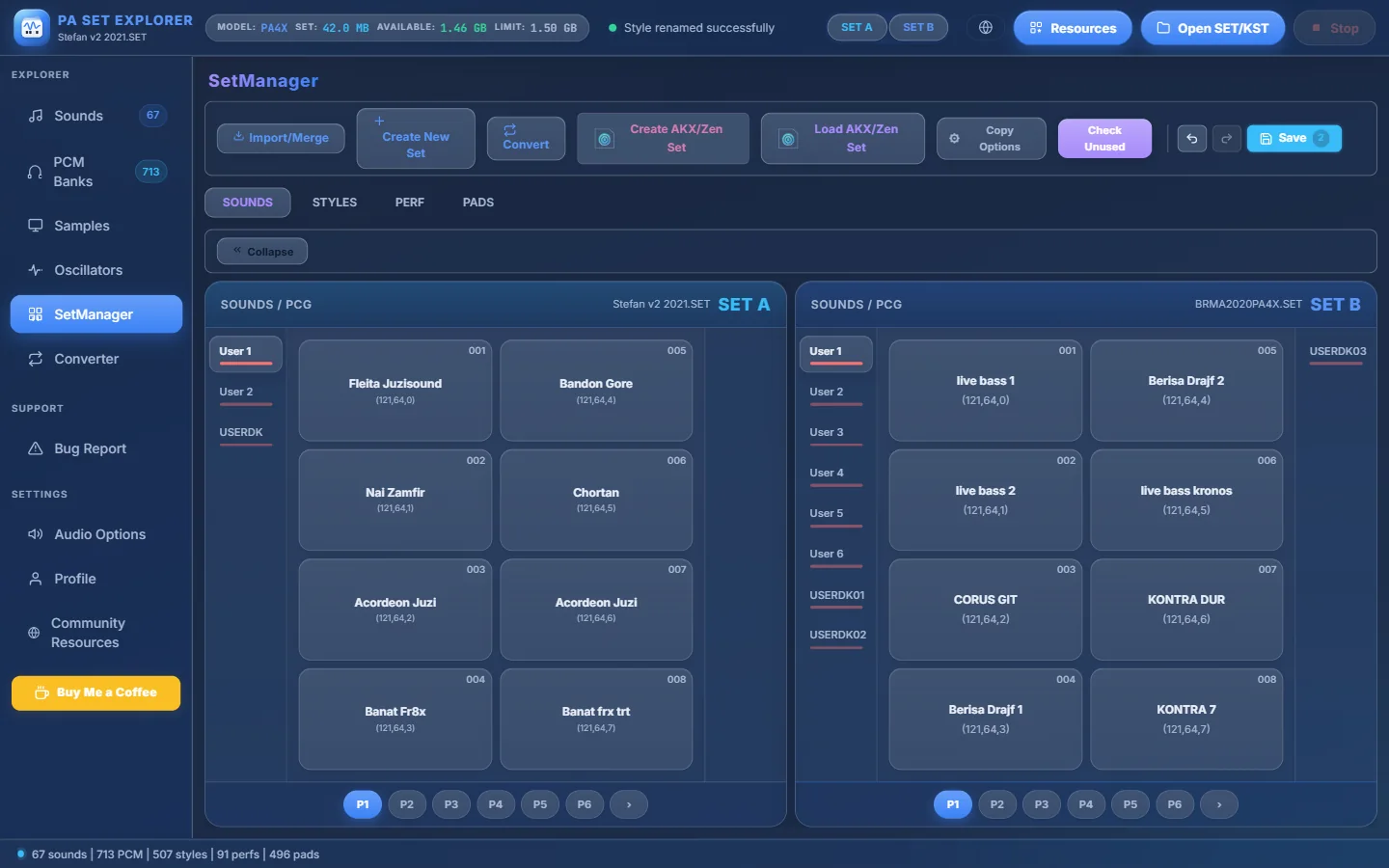
- 1SOUNDS tab.
- 2User sound banks (samplers)…
- 3…and the drum kit bank (USERDK).
- 4A sound with its slot number…
- 5…and its (MSB, LSB, PC) — the numbers a style uses to call it.
- 6SET B also has drum kit banks (USERDK01, USERDK02…).
- 7Pages (and › for more).
- 8The Save button counts your unsaved changes.
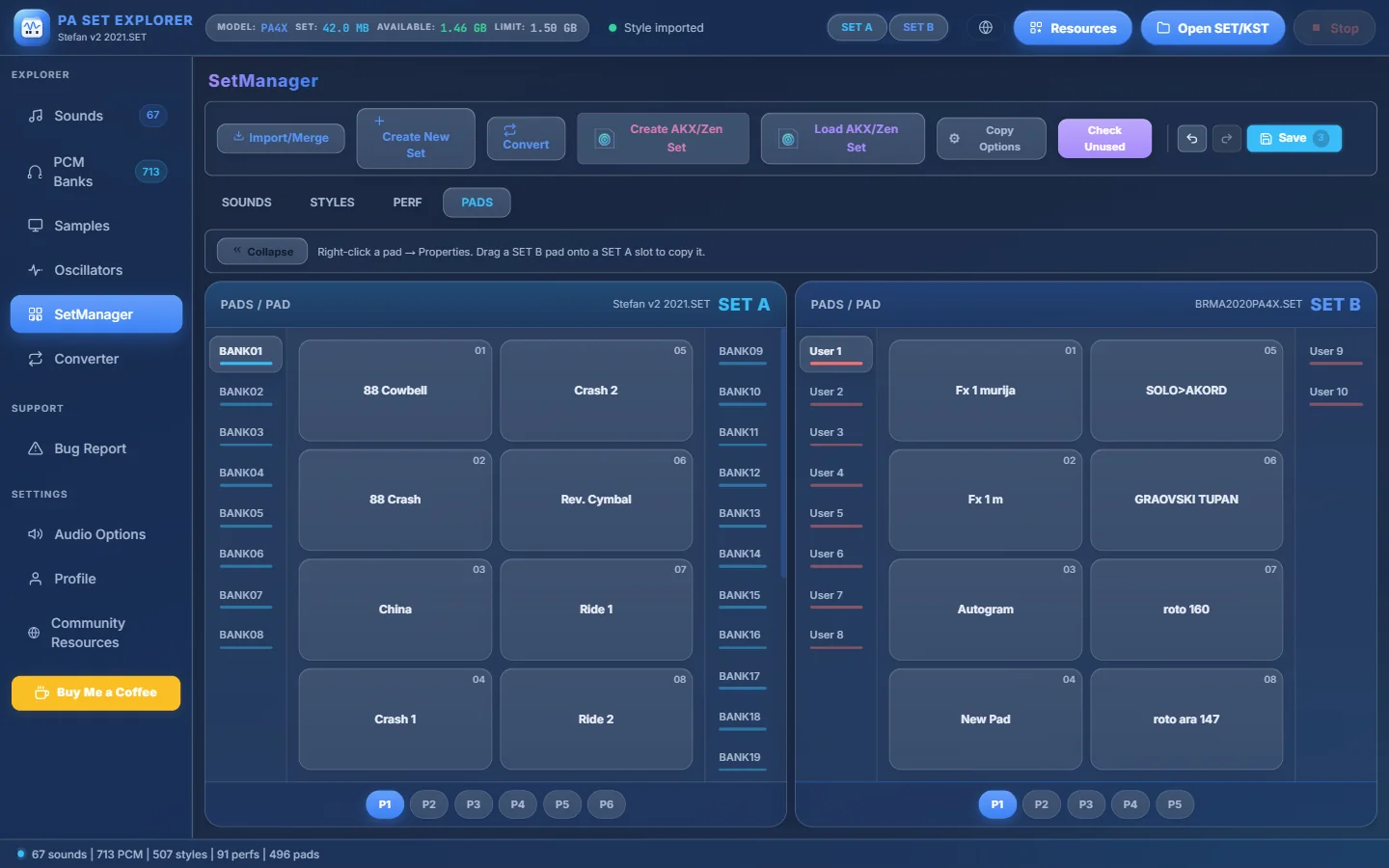
- 1PADS tab.
- 2Right-click a pad → Properties. Drag a SET B pad onto a SET A slot to copy it.
- 3A pad in SET B…
- 4…dragged onto SET A.
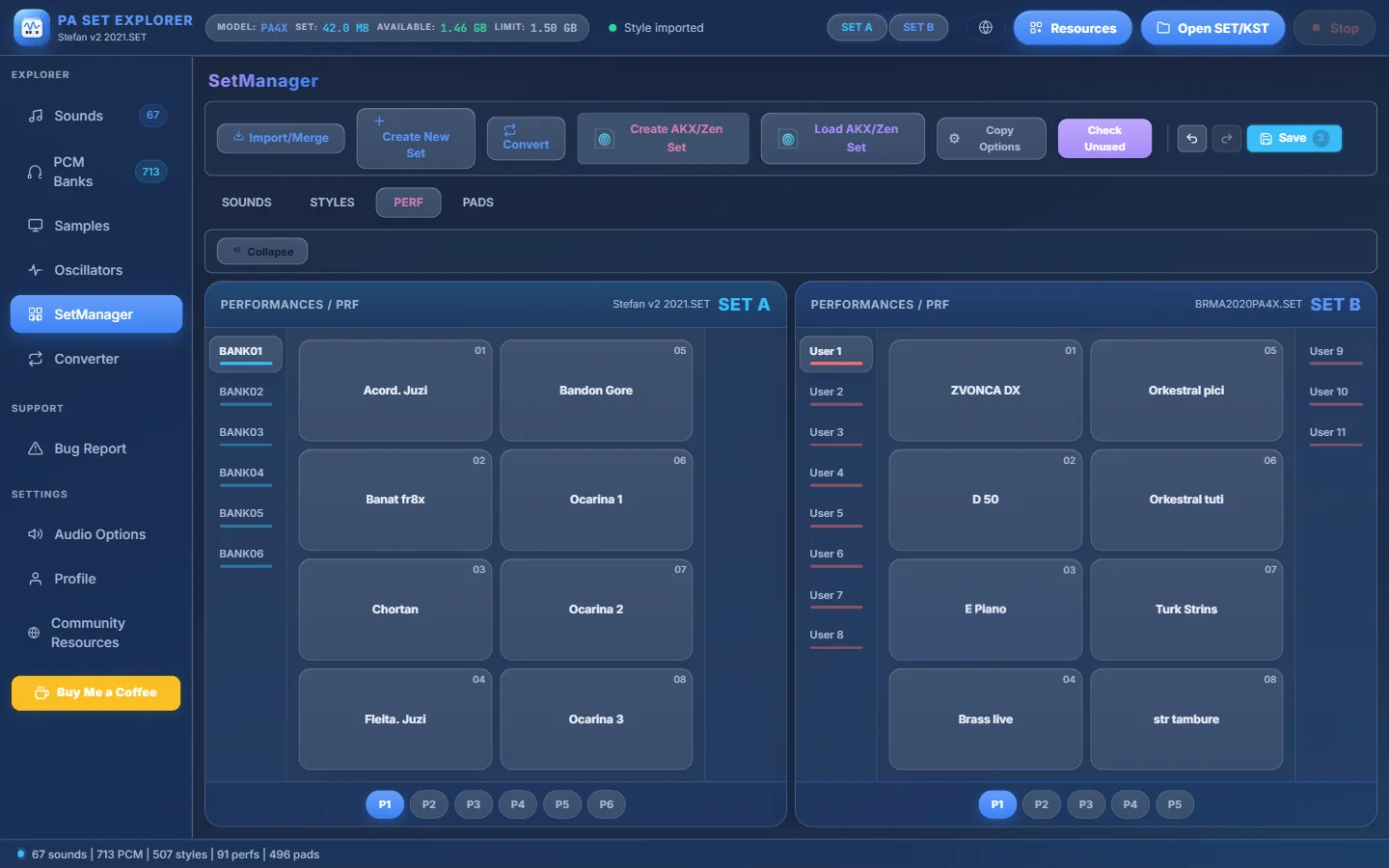
- 1PERF tab.
- 2A performance — right-click for Copy, Rename, Delete, Properties.
- 3Performance banks of SET B.