Combining SETs
Drag & drop between two SETs: single styles, groups, whole pages and banks, sounds and drum kits, pads — between KORG SETs, PA5X KSTs and Medeli AKX sets — and what is copied along.
- What you can do in SET A and what in SET B
- Copying one style, a selection, a page or a whole bank
- Copying samplers, drum kits and pads
- The rules for PA5X KSTs and older SETs
- KORG ↔ Medeli AKX: what goes where
SET A or SET B — who does what#
- The SET you opened with Open SET/KST (or created with Create New Set).
- Everything you drag lands here.
- You can move, rename, delete, import and edit styles, sounds and pads.
- All changes go to a working copy: Undo, Redo and Save.
- Style Properties can be edited.
- The SET you loaded with Import/Merge → KORG SET / KST.
- You take things from here and drop them on SET A.
- Select many items with Ctrl / Shift + click, or drag a whole page or bank.
- Style Properties open read-only (badge “SET B · Read-only”).
- Styles dropped on SET B are not accepted: style drag & drop always goes to SET A.
Copy one style from SET B to SET A#
- 1Set your Copy Options
Click Copy Options and switch on what should travel with the style — usually Save Styles Samples & DrumKits (see Copy Options).
- 2Find the style in SET B and the place in SET A
Choose the bank and page in both SETs. While you drag, resting over a bank button for about 1.5 seconds switches to that bank, and resting over a page button switches the page.
- 3Drag and drop
Press on the style in SET B, move the mouse onto a slot of SET A and release.
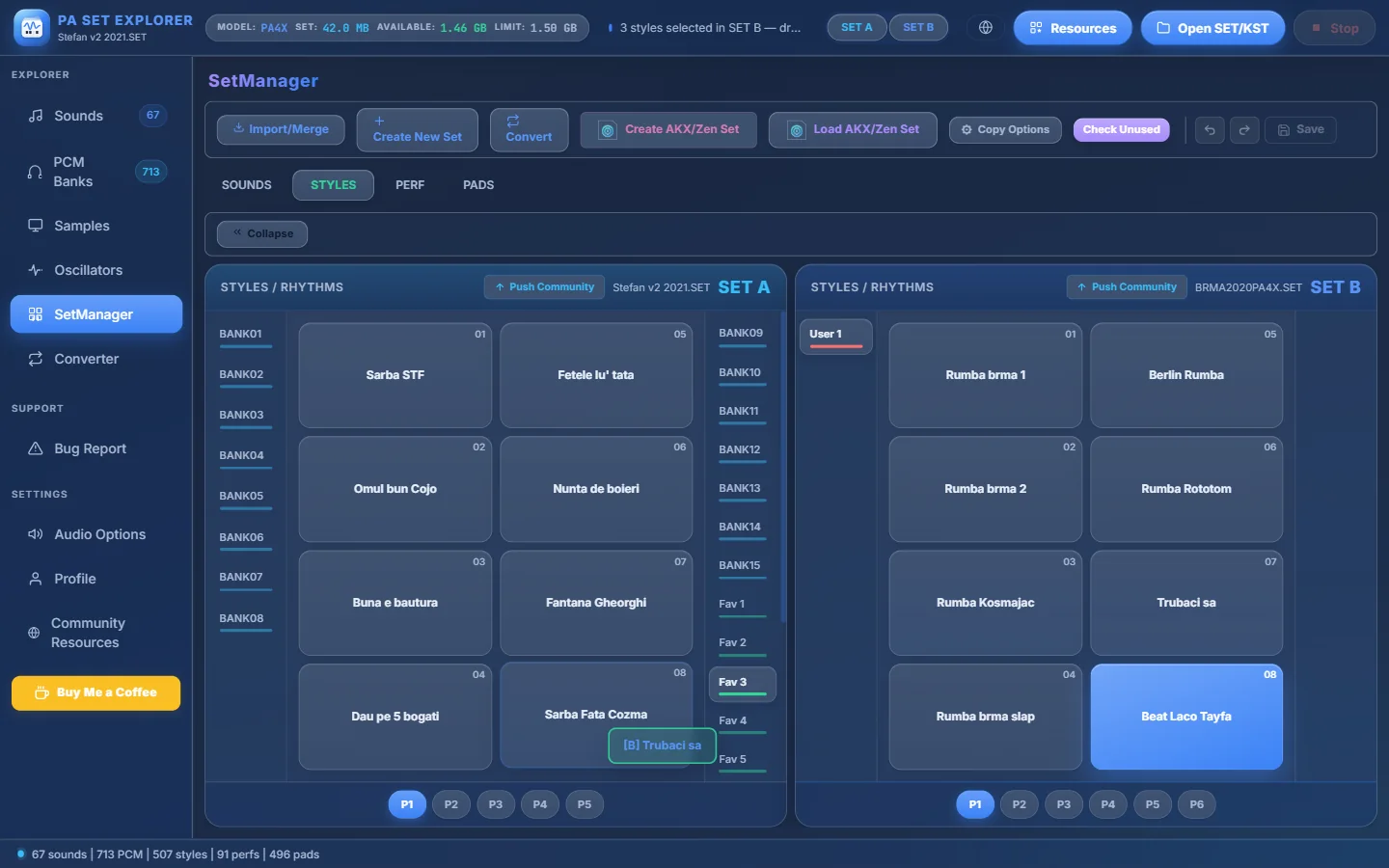
- 1The style in SET B (“Trubaci sa”).
- 2While dragging, a label follows the mouse: [B] Trubaci sa.
- 3Drop it on a slot of SET A.
- 4Resting over a bank switches to it (here Fav 3).
Dragging a style from SET B to SET A. - 4Done!
The style is in SET A. The status says “Style copied from SET B” and the Save button shows how many changes are waiting.
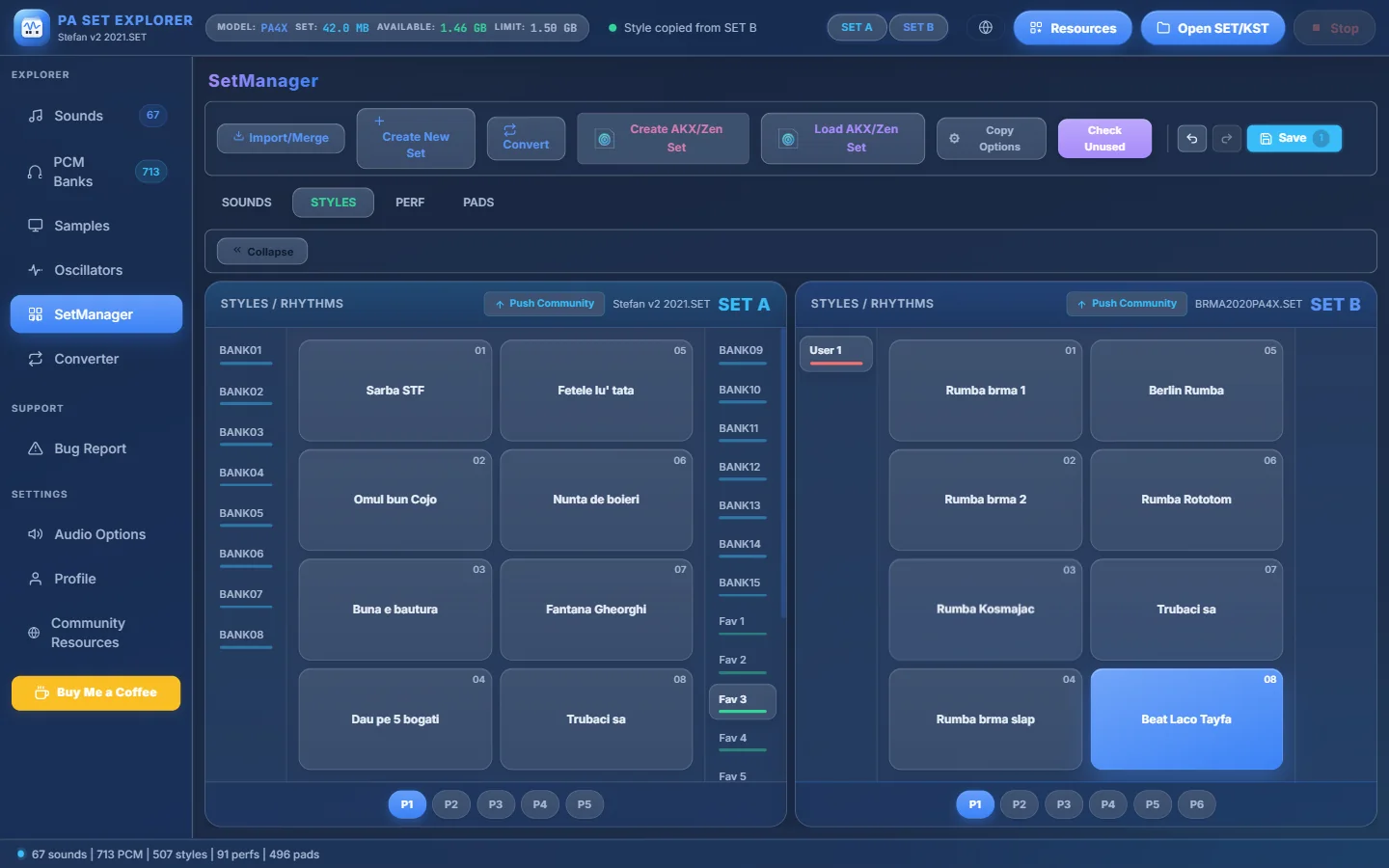
- 1The copied style in SET A.
- 2Undo — take the copy back.
- 3Redo.
- 4Save with the number of pending changes.
- 5“Style copied from SET B”.
After the copy.
Copy many styles: selection, page or bank#
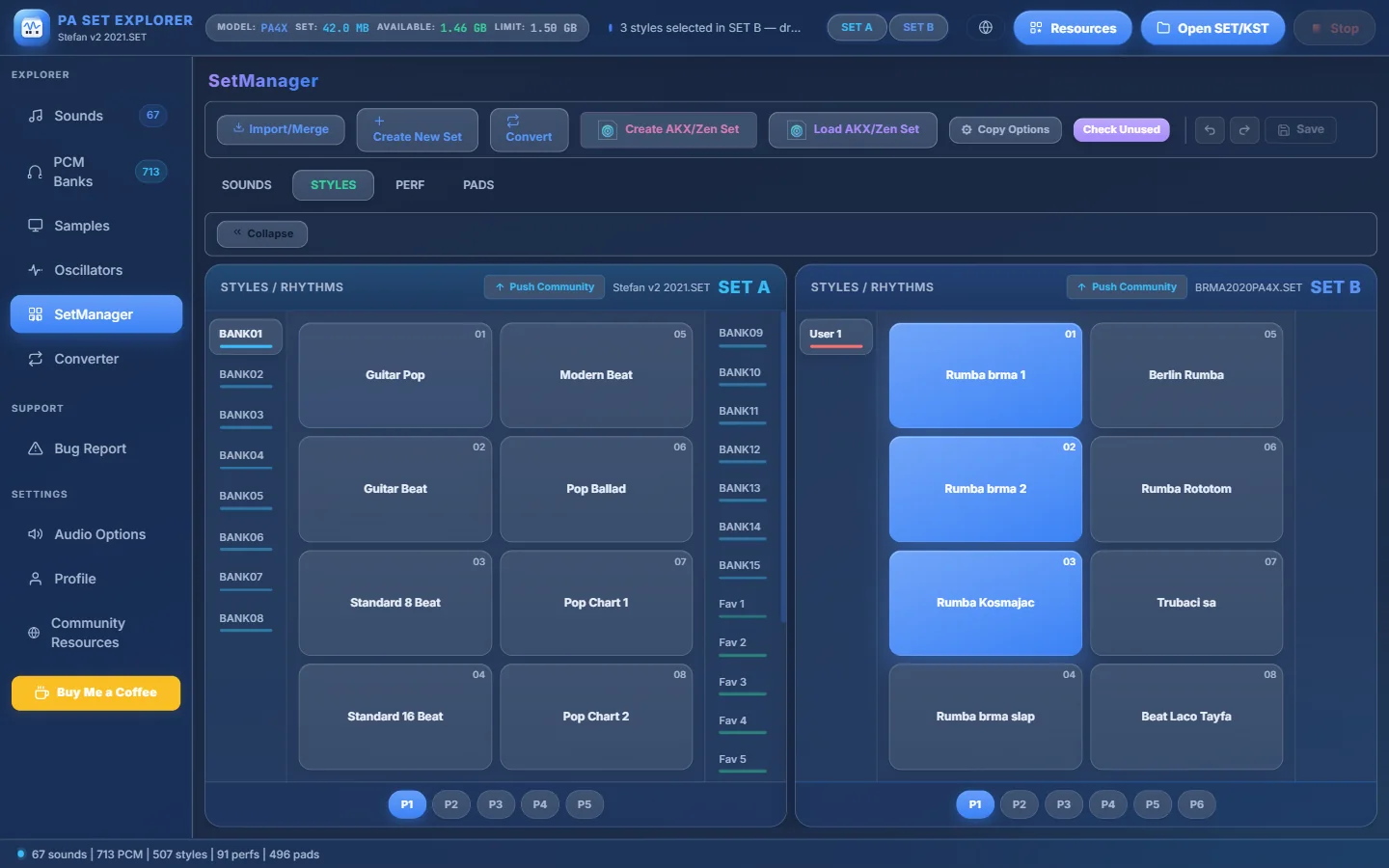
- 1Ctrl + click styles in SET B to select them (or Shift + click for a range).
- 2“3 styles selected in SET B — drag them onto a SET A bank, page or slot”.
- 3Drag the selection onto a SET A bank, page or slot.
- 4You can also drag a SET B page button (P1, P2…)…
- 5…or a whole SET B bank button.
| You drag… | Onto… | What happens |
|---|---|---|
| A selection of styles | a SET A bank, page or slot | The styles fill free slots, starting there. If there are not enough, the rest is reported (“no free slot left…”). |
| A SET B page button | a SET A page | The styles go to the same positions of that page. If styles would be replaced you are asked “Replace N styles?”. |
| A SET B bank button | a SET A bank | The whole bank is copied slot by slot. You are asked “Replace the whole bank?”. SET A styles without a counterpart are removed; the bank’s “New Style” template is kept. |
After a group transfer a Transfer report lists what was copied. The whole group counts as one step for Undo.
- Group transfers work the same way in the SOUNDS tab (samplers to sampler banks, drum kits to drum kit banks).
- Copy Options apply to every style of the group.
Copy samplers and drum kits#
In the SOUNDS tab, drag a sound from SET B onto a slot of SET A. Its samples (PCM) and multisample (RAM.KMP) are copied with it.
- Samplers go into sampler banks (User…), drum kits into drum kit banks (USERDK…). Dropping the wrong type is refused: “Cannot drop drum kit into sampler bank”.
- Inside the same SET, dragging moves the sound. Onto an occupied slot you are asked “Slot Already Occupied” → Replace.
- If SET A has not enough sample memory, the copy stops: “not enough sample memory in SET A (needs X MB, Y MB free)”. Compress samples or remove unused sounds first.
Copy pads#
In the PADS tab, drag a pad from SET B onto a slot of SET A. To bring the pads of a style automatically, switch on Copy Styles Pads (KORG SET↔SET) in Copy Options and copy the style.
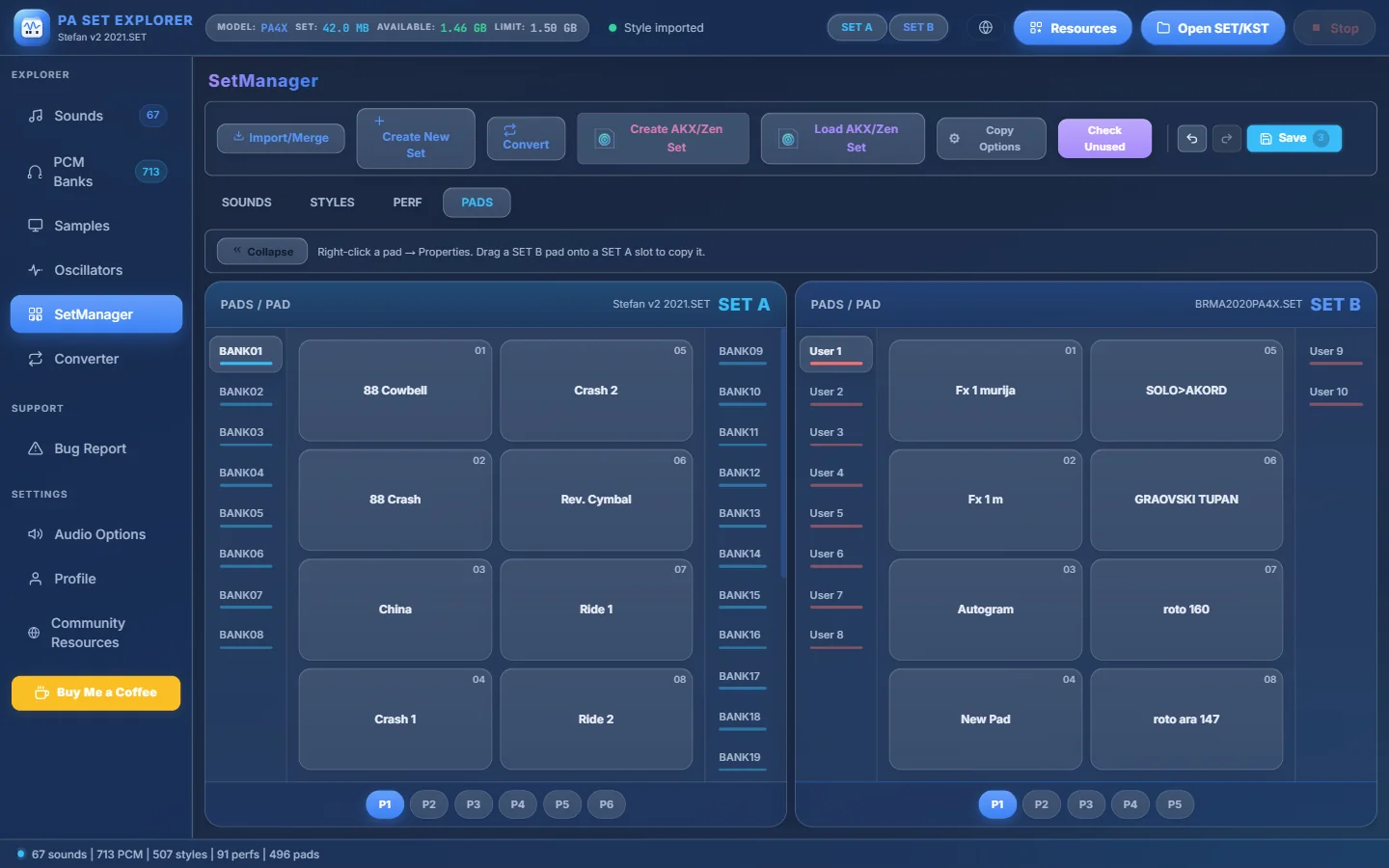
- 1PADS tab.
- 2The hint reminds you how it works.
- 3Pad in SET B.
- 4Drop it on SET A.
PA5X KSTs and older SETs#
A PA5X KST stores styles as .stg files in folders and uses a different sample format. PA SET Explorer converts automatically when needed:
| SET B | SET A | Styles | Samplers & drum kits |
|---|---|---|---|
| KORG SET (PA300 – PA4X) | KORG SET | Copied as KORG styles. | Copied with their samples. |
| PA5X KST | KORG SET | Each .stg is rebuilt as a KORG style. | Copied (converted to the older sample format). |
| KORG SET (PA300 – PA4X) | PA5X KST | Each style is converted to .stg. With Save Styles Samples & DrumKits, its user sounds are copied into the KST too and the .stg points to them. | Copied into the KST’s sample banks (same bank and slot when possible). |
| PA5X KST | PA5X KST | Copied byte for byte. With Save Styles Samples & DrumKits its user sounds come along. | Copied — only from SET B to SET A. |
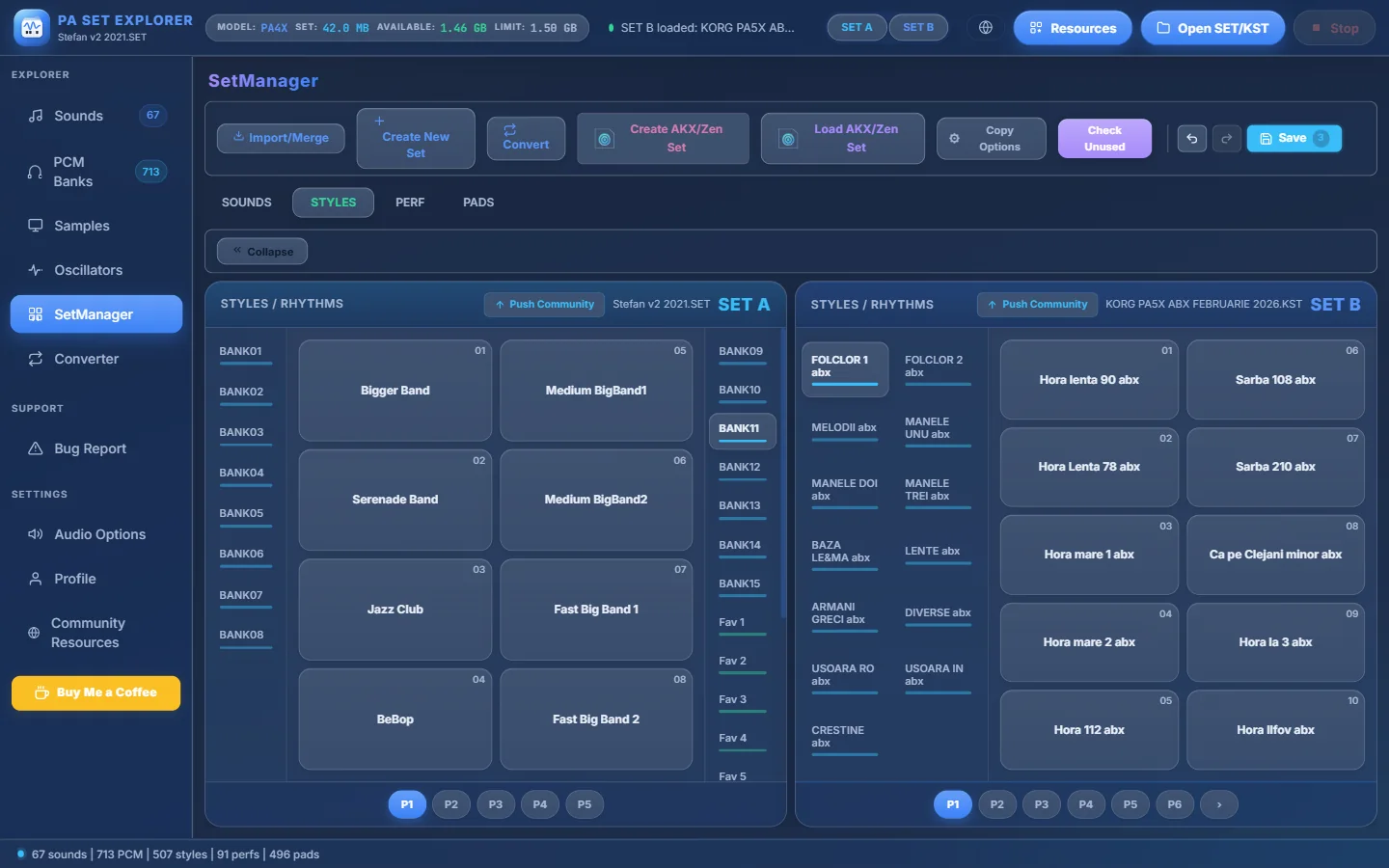
- 1SET B is a PA5X KST.
- 2PA5X style folders, all listed in a two-column grid.
- 3PA5X pages have 10 slots.
- 4Drag a PA5X style onto your older KORG SET: it is rebuilt as a KORG style.
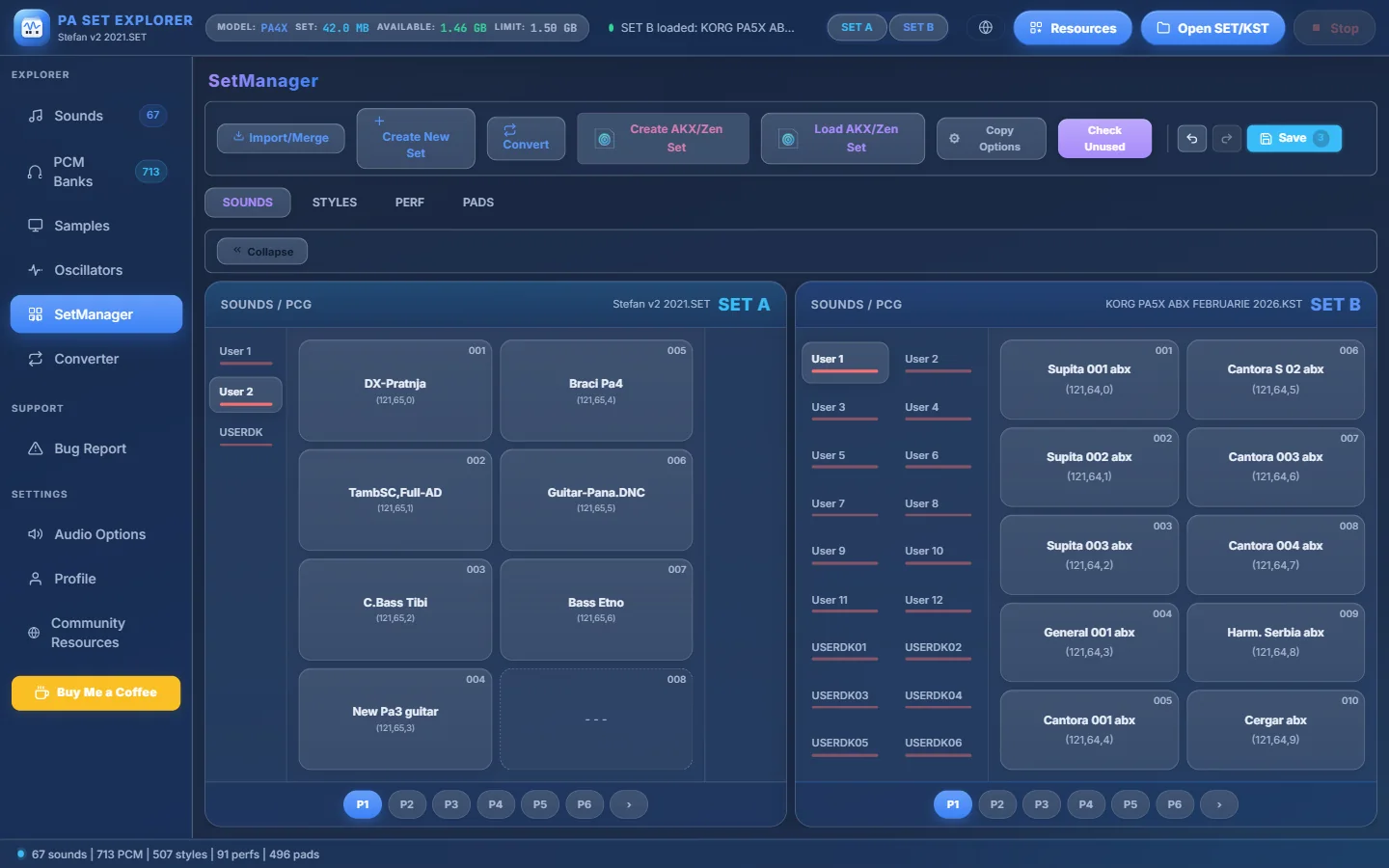
- 1PA5X user sound banks (User 1 – User 12)…
- 2…and drum kit banks (USERDK01 – USERDK06).
- 3A PA5X sampler…
- 4…dragged onto an empty slot of SET A.
KORG ↔ Medeli AKX / Zen#
With a KORG SET and a Medeli AKX set open side by side (Import/Merge → Medeli AKX / Zen expansion), you drag KORG items onto the AKX packs. Everything is converted on the fly:
| Drag this KORG item… | …onto this AKX pack | Becomes |
|---|---|---|
| A style | a Styles pack | a Medeli .sty (Copy Options decide samples, STS, pads, guitar transcription) |
| A sampler (sound) | a Samples pack | a Medeli voice (.voi) |
| A drum kit | a DrumKits pack | a Medeli drum kit (.kit) |
| A whole KORG bank button | the AKX panel | a new pack named after the bank, with everything converted |
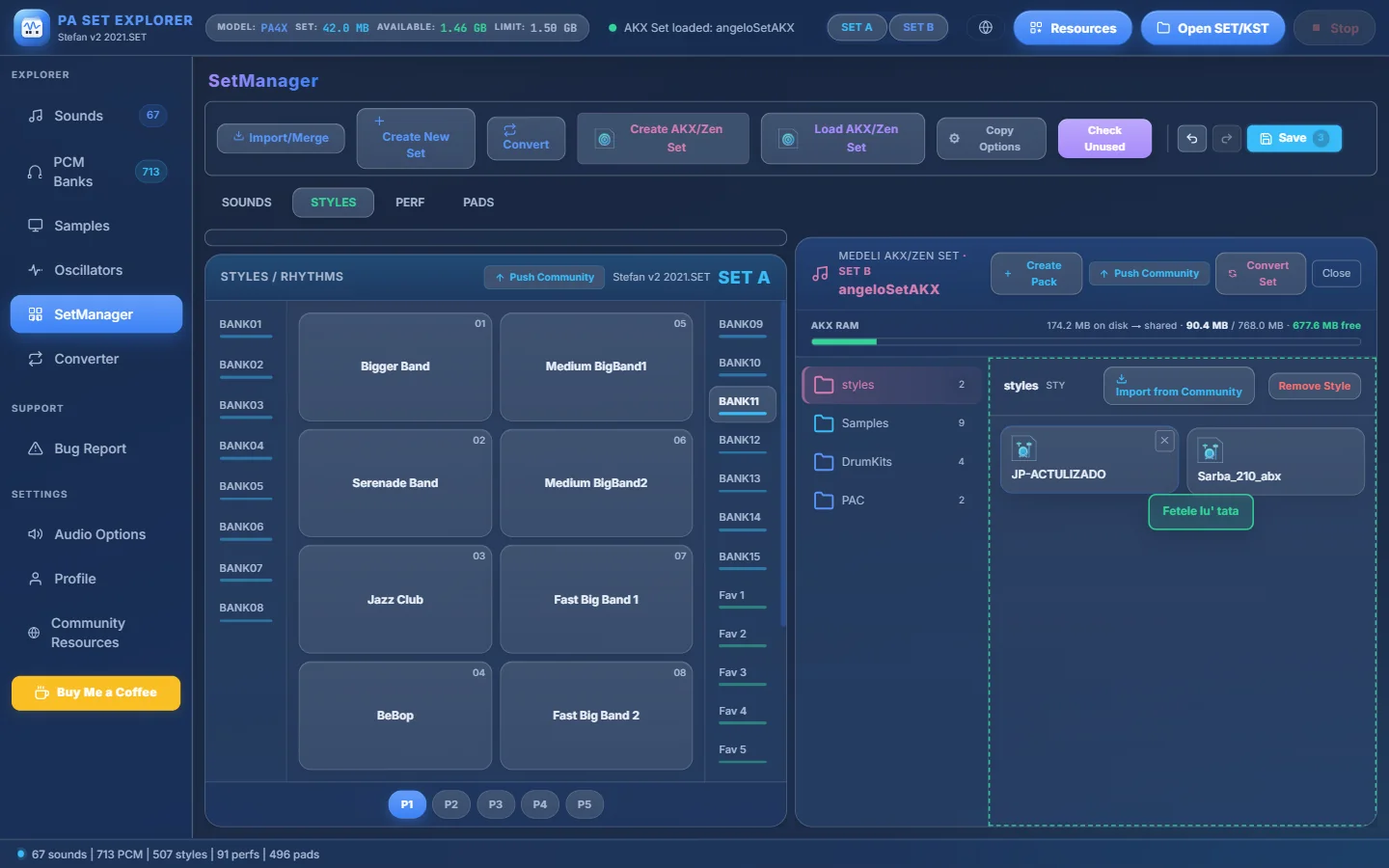
- 1Dragging the KORG style “Fetele lu’ tata”…
- 2…over the AKX Styles pack: the drop zone lights up.
- 3The selected pack (“styles”).
- 4Remove Style — remove a style from the pack.
And the other way: AKX → KORG#
- To turn a whole AKX set into a KORG SET, use Convert in SetManager → choose the Medeli AKX set → Convert Medeli AKX set to KORG.
- To bring one Medeli voice or kit into a KORG SET, right-click an empty slot in the SOUNDS tab → Import Sampler (.voi) or Import DrumKit (.kit) — see Importing.
Full details in the Medeli AKX / Zen chapter.