Converter
Convert one style between KORG Pa (.STY), KORG PA5X (.stg), Yamaha, Medeli AKX, Ketron and MIDI — with section mapping, previews, warnings, a fidelity check and per-track settings. Plus a look at the Sampler Converter that is coming soon.
- Which formats you can convert from and to
- Converting a style step by step
- Reading the section map, warnings and target capabilities
- Fine-tuning the result with Style Settings (tracks, chord rules, hand sounds)
- Checking the result with Verify Fidelity
What the Converter does#
The Style Converter takes one style in any supported format and writes it in another format, so you can play a KORG style on a Yamaha, a Yamaha style on a KORG, a PA5X style on an older Pa, a style on a Medeli AKX, and so on.
Supported formats#
| Format | Import (source) | Export (target) | Notes |
|---|---|---|---|
| KORG Pa .STY (PA300 – PA4X) | ✔ (a bank: you pick the style) | ✔ “KORG PA700/1000/PA4X (.STY)” and “KORG PA300/600/900 (.STY)” | Multi-CV, NTT/ranges, any meter. |
| KORG PA5X .stg | ✔ | ✔ “KORG PA5X (.stg)” | Multi-CV, NTT/ranges. Per-track EQ is not carried. |
| Yamaha .sty (SFF) | ✔ | ✔ “Yamaha Style (.sty)” | 1 CV per part (+1 alternative), CASM chord rules, OTS. |
| Medeli AKX10 .sty | ✔ | ✔ “Medeli AKX10 (.sty)” | 1 CV, rules via CASM, Quick Settings, 4/4 grid only. |
| Ketron / Audya .kst | ✔ | ✔ “Ketron / Audya (.kst)” | MAJ/MIN/SEV built from the CVs, no NTT/ranges. |
| Standard MIDI .mid | ✔ only with section markers (Main A, Intro 1, Fill In AA…) | ✔ “Standard MIDI (.mid) — up to 2 CVs” | One marker per section. |
| PA SET EXPLORER MIDI .mid | ✔ | ✔ “PA SET EXPLORER MIDI (.mid) — edit in a DAW, convert back” | Every CV is a segment and the original style travels inside: convert it back after editing in a DAW. |
Convert a style, step by step#
- 1Open the Converter
Click Converter in the sidebar. Make sure Style Converter is selected at the top.
- 2Import the style
Click ⬆ Import Style/Mid… and choose where the style comes from:

- 1Community — one of the styles you downloaded from the Community.
- 2Browse… — any style or MIDI file on your PC (.STY, .sty, .stg, .kst, .mid).
If the file is a KORG .STY bank with several styles, a list appears: pick the one you want. - 3Choose the target and check everything
Pick the target in Target:. The screen fills with the section map:
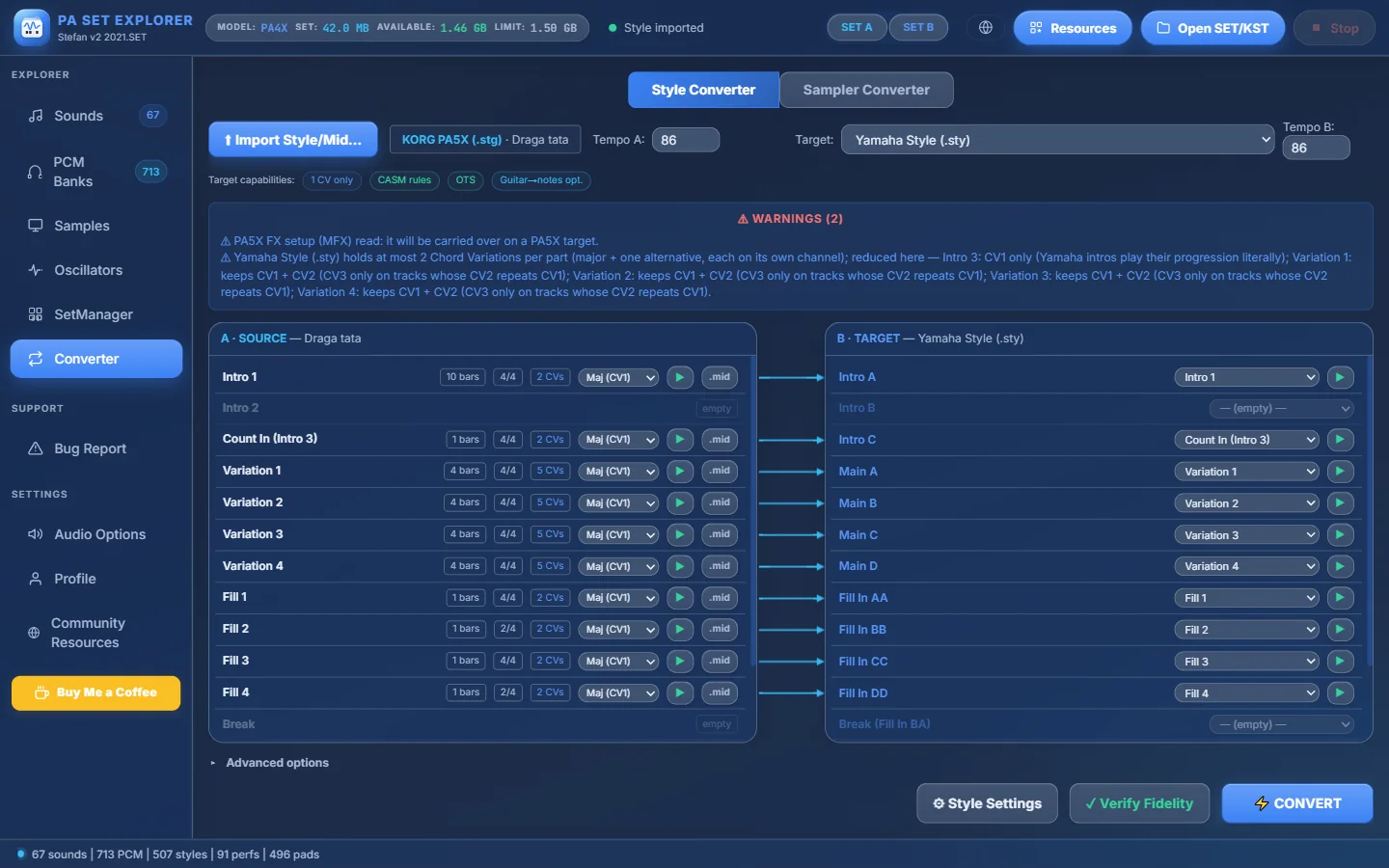
- 1Style Converter / Sampler Converter (the second one is still in development).
- 2Import another style.
- 3What you imported: format and name (here a PA5X .stg).
- 4Tempo A — tempo for previews of the source.
- 5Target — the format to convert to.
- 6Tempo B — tempo written into the converted style.
- 7Target capabilities — what the target can and cannot store (here: Yamaha keeps 1 CV, uses CASM rules, OTS…).
- 8Warnings — everything that will change or be simplified for this target. Read them!
- 9A source section with its bars, time signature and number of Chord Variations (CVs).
- 10Choose which CV you preview / export.
- 11▶ preview the section (click again to stop).
- 12.mid — export just this section as a MIDI file.
- 13Arrows show where each source section goes (blue = same place, orange = moved).
- 14Each target section lets you choose which source section fills it, or “— (empty) —”.
- 15▸ Advanced options — output name and special switches.
- 16⚙ Style Settings — tracks, chord rules and hand sounds of the result.
- 17✓ Verify Fidelity — convert in memory and compare.
- 18⚡ CONVERT — write the file.
A PA5X style (“Draga tata”) ready to become a Yamaha style. - 4Optional: Advanced options
Open ▸ Advanced options to rename the output or use the special switches:
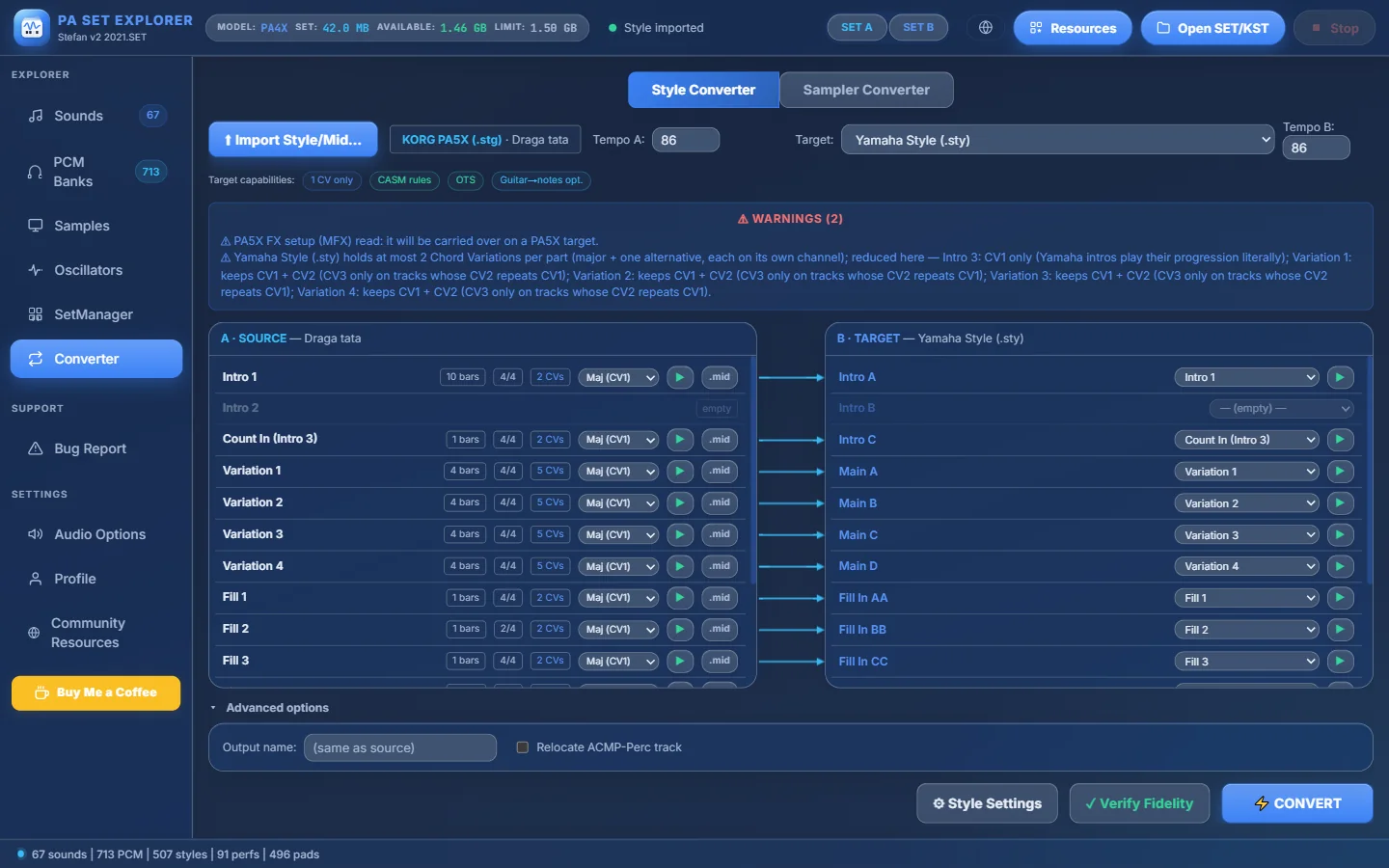
- 1Open / close the options.
- 2Output name — leave empty to keep the source name. If the file exists, “(1)” is added.
- 3Relocate ACMP-Perc track (Yamaha / Medeli targets) — moves melodic ACMP-Percussion content to a free melodic channel so the target does not play it as drums.
For KORG and PA5X targets the switch is Faithful ranges (no widening): it keeps the source keyboard ranges exactly. It is ticked automatically when the source is KORG. - 5Press ⚡ CONVERT
Choose the output folder. If the source has KORG Guitar Mode tracks and the target is Yamaha, Medeli or Ketron, you are asked “Transcribe Guitar Mode Tracks?” — Yes rebuilds them as real guitar notes, No keeps the raw KORG trigger notes. For Medeli targets you may also see “No free part for a chord-following track” (see the FAQ). When it is done, a message shows “Style converted: <file>”.
Style Settings — fine-tune the result#
⚙ Style Settings changes only the converted output — the source file is never modified. It has three tabs.
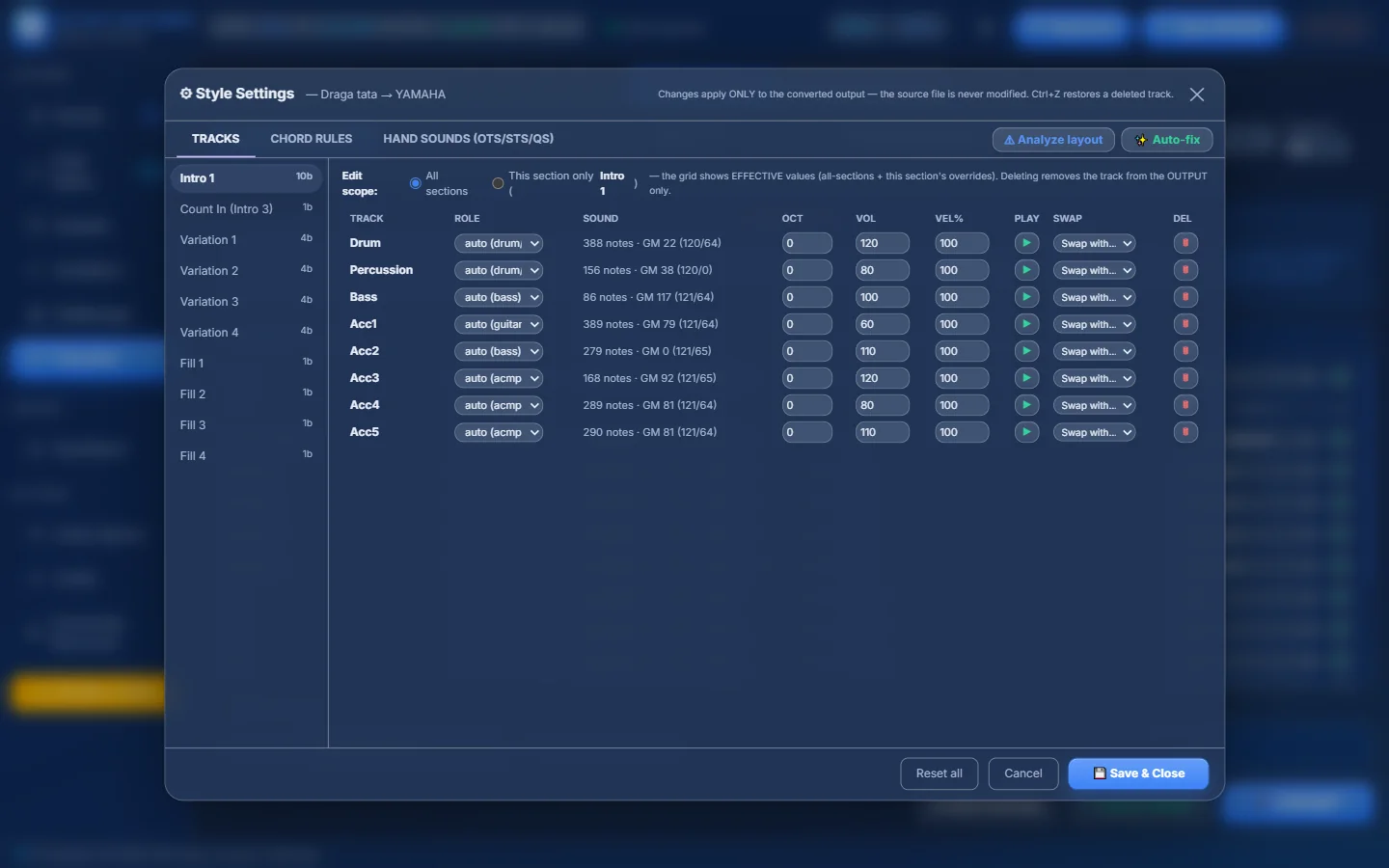
- 1TRACKS, CHORD RULES and HAND SOUNDS (OTS/STS/QS).
- 2Changes apply only to the output. Ctrl+Z restores a deleted track.
- 3⚠ Analyze layout finds role conflicts for the target · ✨ Auto-fix applies the suggested fixes.
- 4The sections of the style — click one to edit it.
- 5Edit scope: change the track in All sections or This section only.
- 6ROLE — auto (detected) or force drum / perc / bass / acmp / guitar.
- 7The track’s notes and sound (read-only).
- 8OCT (−3…+3), VOL (0–127) and VEL% (10–200) of the track.
- 9▶ — listen to this track alone.
- 10Swap with… — exchange two tracks.
- 11🗑 — remove the track from the output (↩ brings it back).
- 12Reset all, Cancel or 💾 Save & Close — saved settings are used by Convert and Verify.
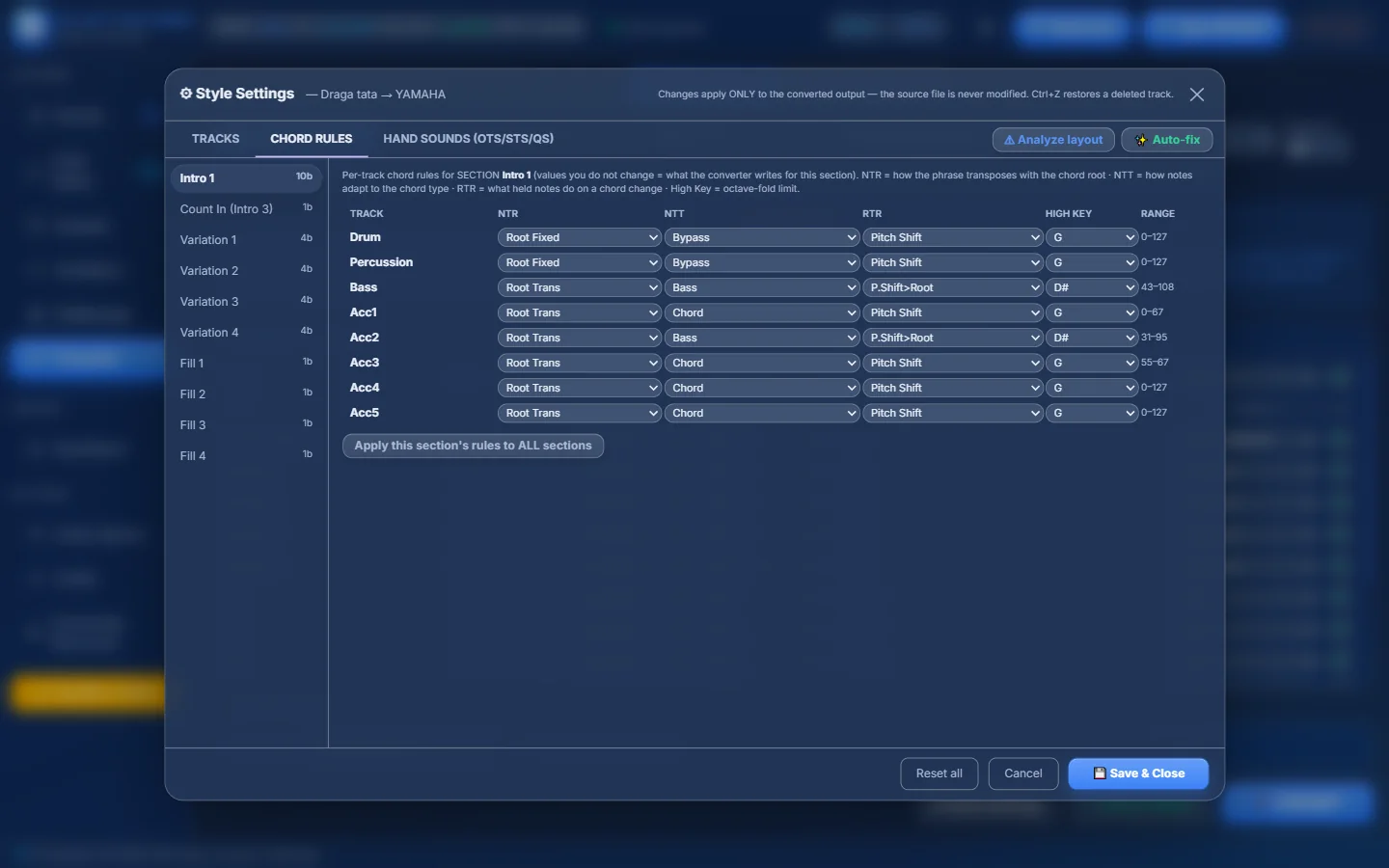
- 1CHORD RULES (only for Yamaha and Medeli targets).
- 2What each column means.
- 3NTR — how the phrase follows the chord root: Root Trans or Root Fixed.
- 4NTT — how notes adapt to the chord type: Bypass, Melody, Chord, Bass, Melodic Min, Harmonic Min.
- 5RTR — what held notes do on a chord change: Stop, Pitch Shift, P.Shift>Root, Retrigger, Retrig>Root.
- 6HIGH KEY — the octave-fold limit.
- 7The note range of the track (read-only).
- 8Apply this section’s rules to ALL sections.
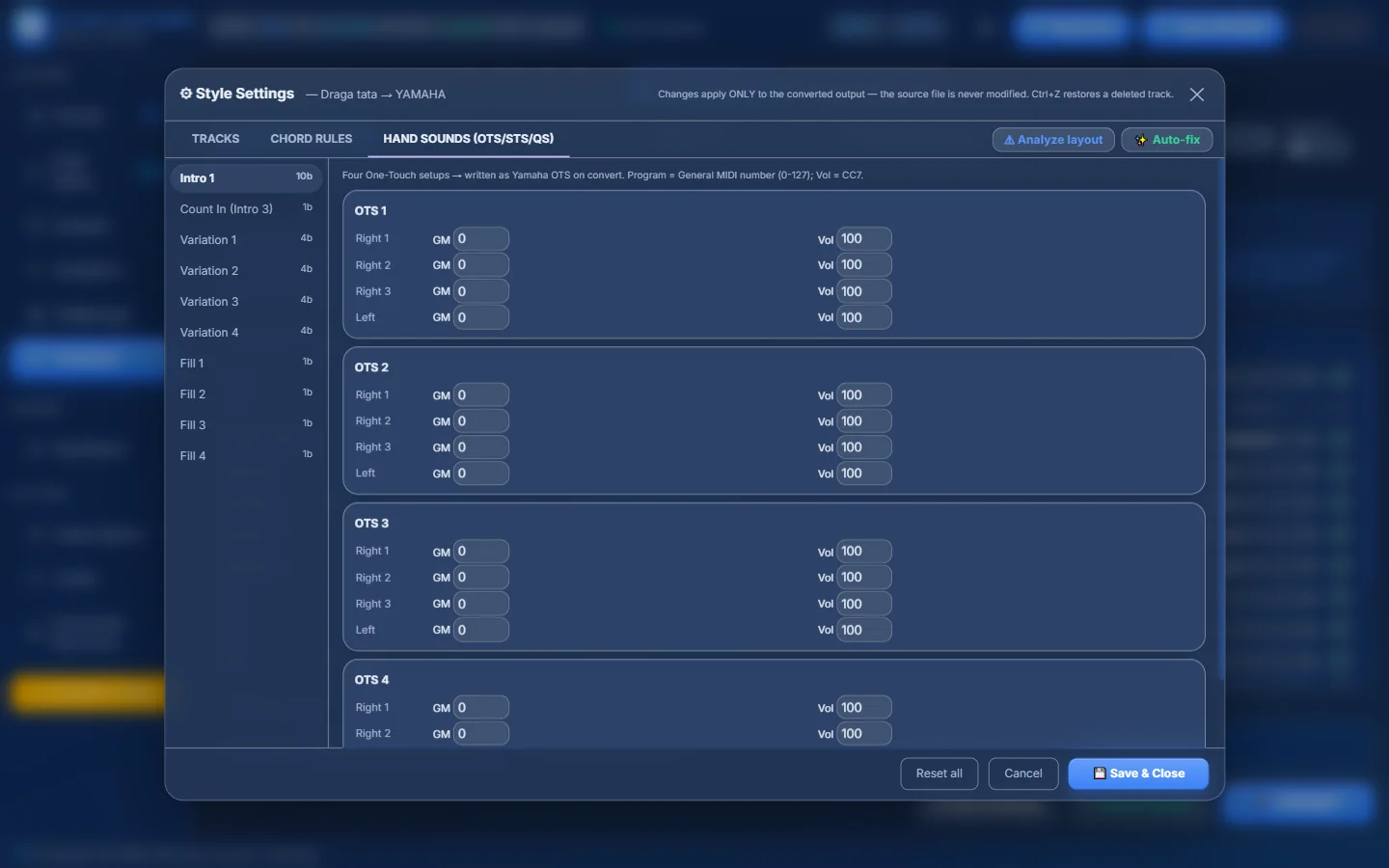
- 1HAND SOUNDS — written as OTS (Yamaha), QS (Medeli) or STS (KORG).
- 2Program = General MIDI number, Vol = volume.
- 3Four setups, each with Right 1, Right 2, Right 3 and Left.
- 4GM program number (0–127).
- 5Vol (0–127).
Verify Fidelity — check before you convert#
✓ Verify Fidelity converts the style in memory, reads the result back and compares it with the source:
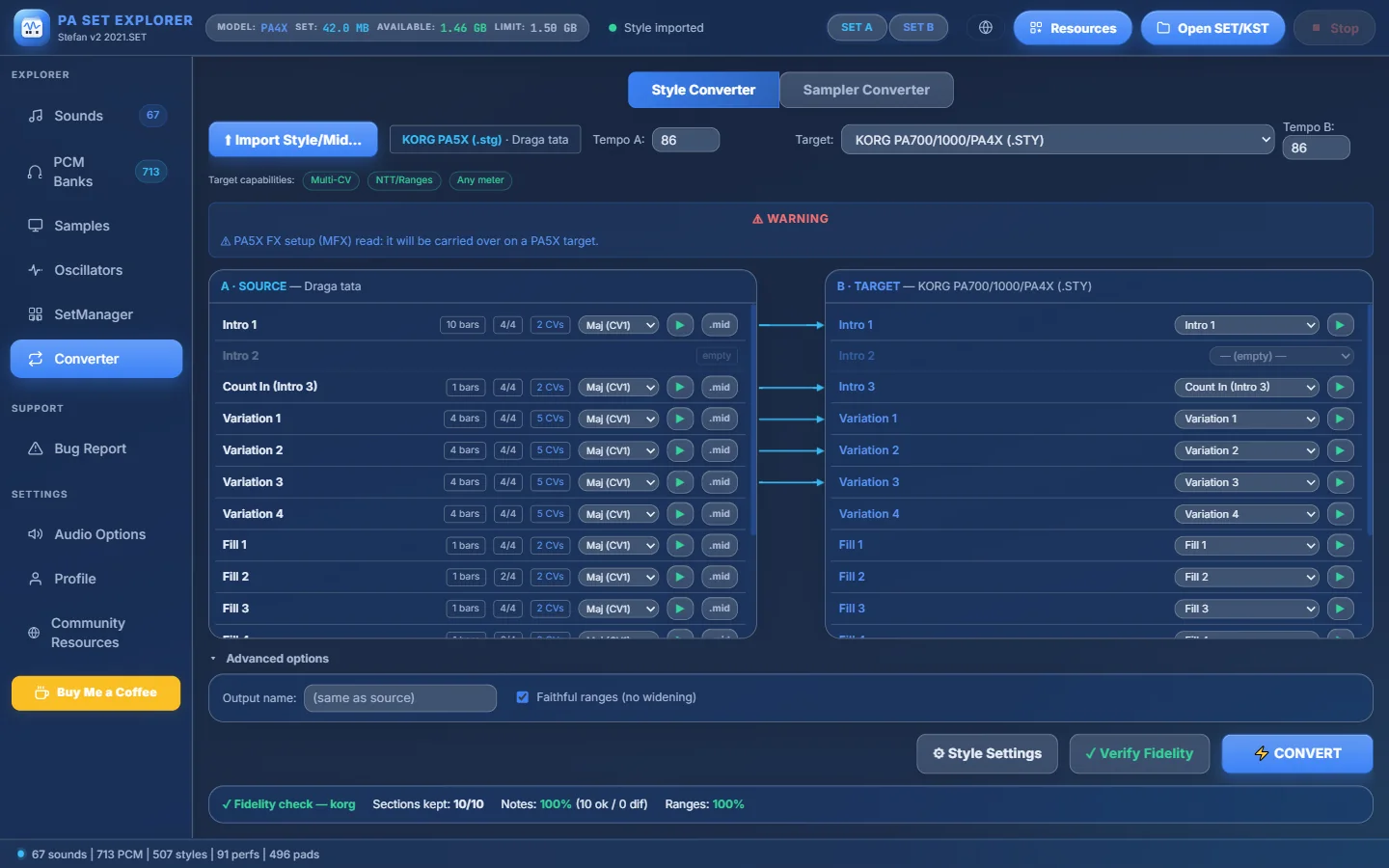
- 1Target: KORG PA700/1000/PA4X (.STY).
- 2This target keeps every CV, the NTT and ranges, and any time signature.
- 3Faithful ranges is ticked automatically for KORG targets.
- 4Press ✓ Verify Fidelity.
- 5Result: Sections kept 10/10, Notes 100%, Ranges 100% — a perfect conversion.
Sampler Converter (in development)#
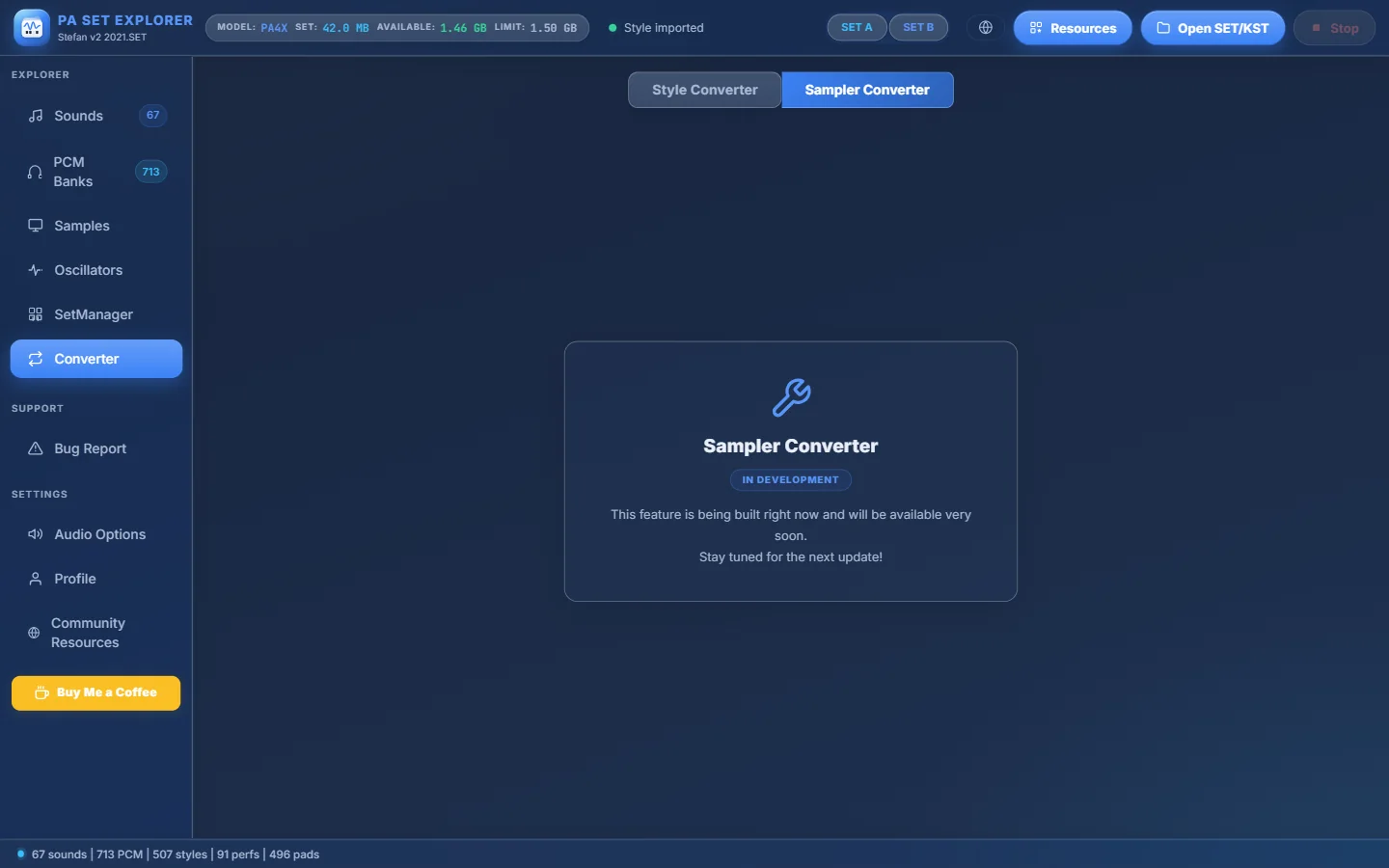
- 1Sampler Converter.
- 2The feature is being built and will arrive in a coming update.
- 3IN DEVELOPMENT.
Tips for great conversions#
- Always read the Warnings box: it tells you exactly what the target cannot store.
- Listen to a few sections with ▶ on both sides before converting — the previews sound like the exported .mid.
- Converting between KORG Pa and PA5X keeps the most information: use Verify Fidelity to see it.
- For Yamaha and Medeli, open Style Settings → CHORD RULES to check how each track follows the chords.
- Use .mid on a section to quickly share or inspect one part of a style.
- Want the style inside a SET instead of as a file? Use Import Style on an empty slot in SetManager: it uses this same converter.