PA SET EXPLORER
Features
Community
Pricing
Blog
Forum
Log In
Register
Get License
Donate
PA SET EXPLORER
Navigation
Features
Community
Pricing
Blog
Forum
Donate
Forum
Bugs / Errors / Problems
UI Issues
UI Issues
Started by
JagiChan
· 16 Apr 2026, 10:35 · 188 views
↗ Share
J
JagiChan
Member
16 Apr 2026, 10:35
Original post
#1
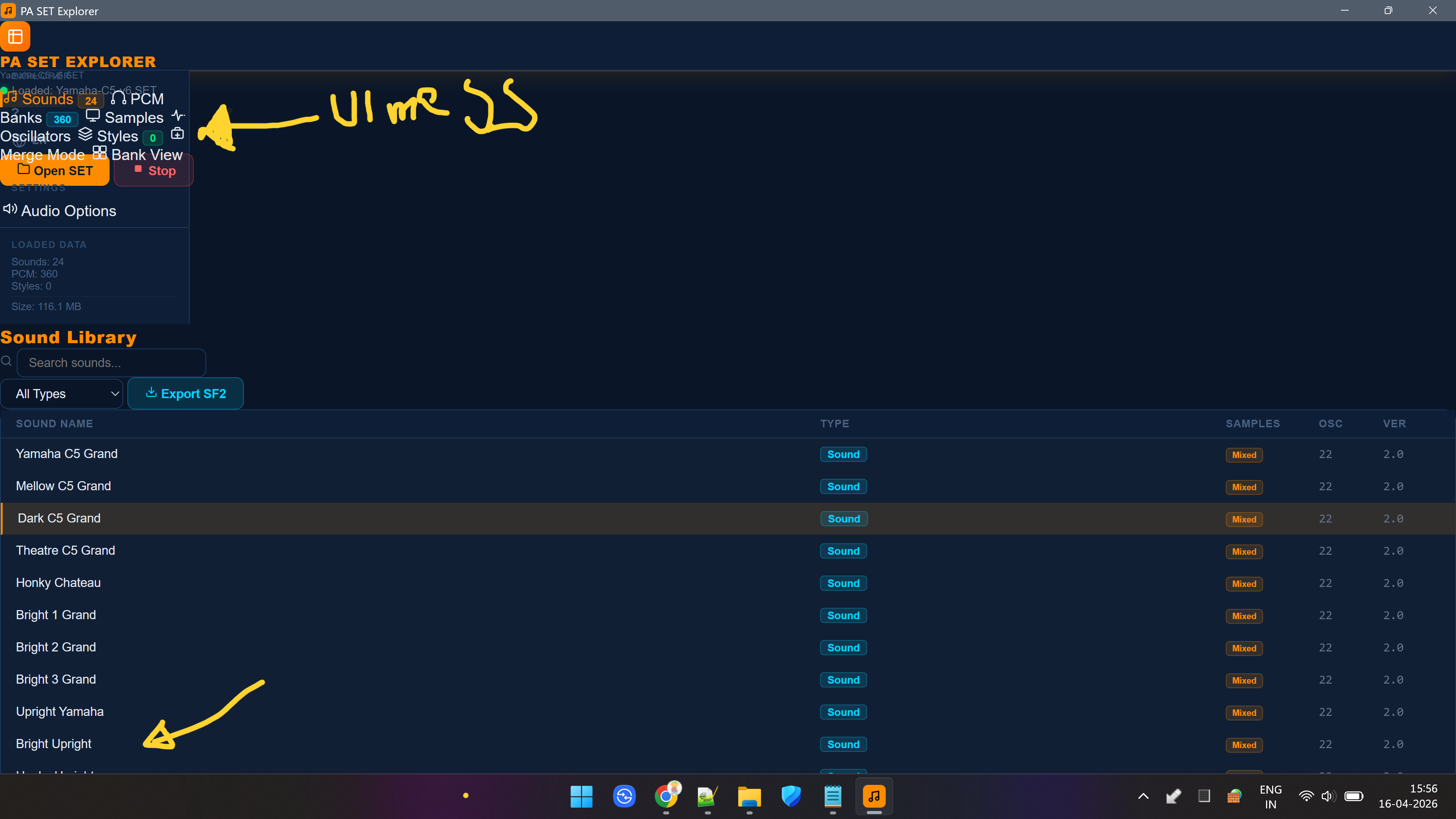
1. The UI on the Left side is messed up. (the text below is obscured by the buttons).
2. There is no slider to move / select other samples other than on the screen (there are more samples in the set but cannot be selected).
♡
0
PSE
PA SET EXPLORER
Admin
18 Apr 2026, 15:52
#2
Fixed in new version!
♡
1
J
JagiChan
Member
19 Apr 2026, 13:09
#3
PA SET EXPLORER wrote:
Fixed in new version!
Great, I had a look at it and now the menu is clean.
♡
0
You must be logged in to reply.
Register
Log In